
Realtime chat example using Supabase
This is a full-stack Slack clone example using:
- Frontend:
- Next.js.
- Supabase.js for user management and realtime data syncing.
- Backend:
- app.supabase.io: hosted Postgres database with restful API for usage with Supabase.js.
Demo
- Live demo: http://supabase-slack-clone-supabase.vercel.app/
- CodeSandbox: https://codesandbox.io/s/github/supabase/supabase/tree/master/examples/nextjs-slack-clone
- Video tutorial: https://www.loom.com/share/31eec9b656e44b8d87c88bde8a465676

Deploy your own
1. Create new project
Sign up to Supabase - https://app.supabase.io and create a new project. Wait for your database to start.
2. Run "Slack Clone" Quickstart
Once your database has started, run the "Slack Clone" quickstart.

3. Get the URL and Key
Go to the Project Settings (the cog icon), open the API tab, and find your API URL and anon key. You'll need these in the next step.
The anon key is your client-side API key. It allows "anonymous access" to your database, until the user has logged in. Once they have logged in, the keys will switch to the user's own login token. This enables row level security for your data. Read more about this below.
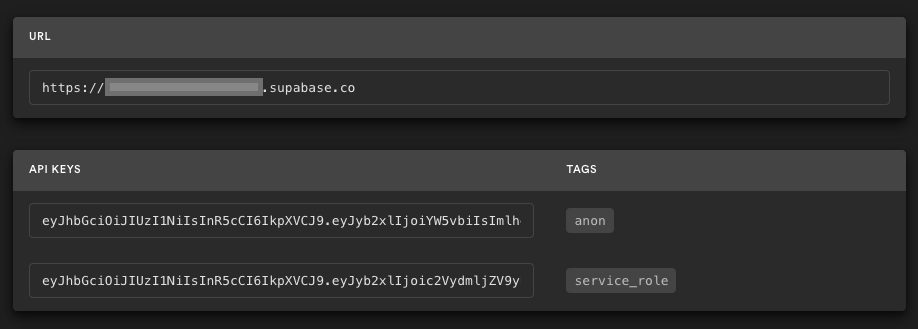
NOTE: The service_role key has full access to your data, bypassing any security policies. These keys have to be kept secret and are meant to be used in server environments and never on a client or browser.
4. Deploy the Next.js client
Here, we recommend forking this repo so you can deploy through Vercel by clicking the button above. When you click the button, replace the repo URL with your fork's URL.
You will be asked for a NEXT_PUBLIC_SUPABASE_URL and NEXT_PUBLIC_SUPABASE_KEY. Use the API URL and anon key from step 3.
5. Change authentication settings if necessary

On app.supabase.io, you can go to Authentication -> Settings to change your auth settings for your project if necessary. Here, you can change the site URL, which is used for determining where to redirect users after they confirm their email addresses or attempt to use a magic link to log in.
Here, you can also enable external oauth providers, such as Google and GitHub.
How to use
Using create-next-app
Execute create-next-app with npm or Yarn to bootstrap the example locally:
npx create-next-app --example with-supabase-auth-realtime-db realtime-chat-app
# or
yarn create next-app --example with-supabase-auth-realtime-db realtime-chat-app
Download manually
Download the example:
curl https://codeload.github.com/vercel/next.js/tar.gz/canary | tar -xz --strip=2 next.js-canary/examples/with-supabase-auth-realtime-db
cd with-supabase-auth-realtime-db
Using this repo
Simply clone this repo locally and proceed to the next section.
Required configuration
Copy the .env.local.example file into a file named .env.local in the root directory of the example:
cp .env.local.example .env.local
Set your Supabase details from from step 3 above:
NEXT_PUBLIC_SUPABASE_URL=<replace-with-your-API-url>
NEXT_PUBLIC_SUPABASE_KEY=<replace-with-your-anon-key>
Change authentication settings if necessary
Follow Step #5 above if you want to change the auth settings.
Run the development server
Now install the dependencies and start the development server.
npm install
npm run dev
# or
yarn
yarn dev
Visit http://localhost:3000 and start chatting! Open a channel across two browser tabs to see everything getting updated in realtime 🥳
Supabase details
Role-based access control (RBAC)
Use plus addressing to sign up users with the admin & moderator roles. Email addresses including +supaadmin@ will be assigned the admin role, and email addresses including +supamod@ will be assigned the moderator role. For example:
// admin user
email+supaadmin@example.com

// moderator user
email+supamod@example.com
Users with the moderator role can delete all messages. Users with the admin role can delete all messages and channels (note: it's not recommended to delete the public channel).
Postgres Row level security
This project uses very high-level Authorization using Postgres' Role Level Security.
When you start a Postgres database on Supabase, we populate it with an auth schema, and some helper functions.
When a user logs in, they are issued a JWT with the role authenticated and their UUID.
We can use these details to provide fine-grained control over what each user can and cannot do.
This is a trimmed-down schema, with the policies:
-- authorize with role-based access control (RBAC)
CREATE FUNCTION public.authorize(
  requested_permission app_permission,
  user_id uuid
)
RETURNS BOOLEAN AS $$
DECLARE
  bind_permissions int;
BEGIN
  SELECT count(*)
  FROM public.role_permissions
  INNER JOIN public.user_roles on role_permissions.role = user_roles.role
  WHERE role_permissions.permission = authorize.requested_permission
    AND user_roles.user_id = authorize.user_id
  INTO bind_permissions;

  RETURN bind_permissions > 0;
END;
$$ LANGUAGE plpgsql SECURITY DEFINER;

-- USER PROFILES
CREATE TYPE public.user_status AS ENUM ('ONLINE', 'OFFLINE');
CREATE TABLE public.users (
  id uuid NOT NULL PRIMARY KEY, -- UUID from auth.users (Supabase)
  username text,
  status user_status DEFAULT 'OFFLINE'::public.user_status
);
ALTER TABLE public.users ENABLE ROW LEVEL SECURITY;
CREATE POLICY "Allow logged-in read access" on public.users FOR SELECT USING ( auth.role() = 'authenticated' );
CREATE POLICY "Allow individual insert access" on public.users FOR INSERT WITH CHECK ( auth.uid() = id );
CREATE POLICY "Allow individual update access" on public.users FOR UPDATE USING ( auth.uid() = id );

-- CHANNELS
CREATE TABLE public.channels (
  id bigint GENERATED BY DEFAULT AS IDENTITY PRIMARY KEY,
  inserted_at timestamp with time zone DEFAULT timezone('utc'::text, now()) NOT NULL,
  slug text NOT NULL UNIQUE
);
ALTER TABLE public.channels ENABLE ROW LEVEL SECURITY;
CREATE POLICY "Allow logged-in read access" on public.channels FOR SELECT USING ( auth.role() = 'authenticated' );
CREATE POLICY "Allow individual insert access" on public.channels FOR INSERT WITH CHECK ( auth.uid() = created_by );
CREATE POLICY "Allow individual update access" on public.channels FOR UPDATE USING ( auth.uid() = created_by );
CREATE POLICY "Allow individual delete access" on public.channels FOR DELETE USING ( auth.uid() = created_by );
CREATE POLICY "Allow authorized delete access" on public.channels FOR DELETE USING ( authorize('channels.delete', auth.uid()) );

-- MESSAGES
CREATE TABLE public.messages (
  id bigint GENERATED BY DEFAULT AS IDENTITY PRIMARY KEY,
  inserted_at timestamp with time zone DEFAULT timezone('utc'::text, now()) NOT NULL,
  message text,
  user_id uuid REFERENCES public.users NOT NULL,
  channel_id bigint REFERENCES public.channels NOT NULL
);
ALTER TABLE public.messages ENABLE ROW LEVEL SECURITY;
CREATE POLICY "Allow logged-in read access" on public.messages FOR SELECT USING ( auth.role() = 'authenticated' );
CREATE POLICY "Allow individual insert access" on public.messages FOR INSERT WITH CHECK ( auth.uid() = user_id );
CREATE POLICY "Allow individual update access" on public.messages FOR UPDATE USING ( auth.uid() = user_id );
CREATE POLICY "Allow individual delete access" on public.messages FOR DELETE USING ( auth.uid() = user_id );
CREATE POLICY "Allow authorized delete access" on public.messages FOR DELETE USING ( authorize('messages.delete', auth.uid()) );
Authors
Supabase is open source, we'd love for you to follow along and get involved at https://github.com/supabase/supabase