mirror of
https://github.com/supabase/supabase.git
synced 2026-10-06 01:45:10 +03:00
 Nik RichersandNik Richers
e0ecaadc21
Nik RichersandNik Richers
e0ecaadc21
## I have read the [CONTRIBUTING.md](https://github.com/supabase/supabase/blob/master/CONTRIBUTING.md) file. YES ## What kind of change does this PR introduce? This PR reworks the `/guides/ai-tools` docs section to be agent-first. The overview now leads with the fastest path to a working setup (the plugin install command), a "What's supported?" card grid showing which coding agents and IDEs work via Plugin and/or MCP (with each product's own tagline, not a generated sentence), and a concepts glossary — instead of a plain four-item list. The sidebar "AI Tools" widget, shown on every guides page, now links to this hub ("Connect your AI agent") instead of opening a ChatGPT/Claude chat frontend. Closes DOCS-1201. ## What is the current behavior? - The `/guides/ai-tools` overview is a plain four-item bullet list with no getting-started path, compatibility info, or concepts explanation. - The sidebar "AI Tools" widget offers "Copy as Markdown", "Ask ChatGPT", and "Ask Claude" — the latter two send you to a chat frontend instead of agent setup. ## What is the new behavior? - `ai-tools.mdx`: intro → plugin install callout → "What's supported?" card grid (`<ContentListings id="ai-tools-supported-agents" />`, icon + tagline + Plugin/MCP badge per agent) → "Key concepts" glossary → "Building AI into your app?" (also converted to `ContentListings`). - New `data/content-listings/ai-tools.data.ts` builds the card grid from the existing `PLUGIN_CLIENTS`/`MCP_CLIENT_DATA` client lists (no new hand-maintained data) — fixing two latent bugs found along the way: GitHub Copilot was keyed differently between the two sources (would have produced duplicate cards), and Windsurf has no upstream docs URL (would have been silently dropped). - New opt-in `badgePosition` field on `ContentListingItem` so the badge renders under the title for the agent grid, without changing the one other existing badge usage (self-hosting's "Official" tag, still inline). - `plugins.mdx`/`mcp.mdx`/`ai-skills.mdx` each get a one-line "Quick start" lead-in so they stand alone via the `.md` content-negotiation route. - `GuidesSidebar.tsx` + `telemetry-constants.ts`: Added "Connect your AI agent" → `/guides/ai-tools`, and the `ask_ai_clicked` event with `agent_setup_clicked`. - Accessibility fix (from review): the "Not supported" indicator now exposes an `sr-only` label instead of being fully `aria-hidden`. ## Additional context - Worktree: `~/GitHub/supabase/supabase-worktrees/nikrichers/docs-1201-make-guidesai-tools-agent-first-and-replace-chat-frontend` - **Open question — Windsurf card**: `windsurf.com` now redirects to a Devin Desktop page (Cognition acquired Windsurf in 2025), but Supabase's own `MCP_CLIENT_DATA` still targets Windsurf's distinct config path (`~/.codeium/windsurf/mcp_config.json`), so the card is still labeled "Windsurf" with its pre-acquisition tagline ("The first agentic IDE. Tomorrow's editor, today."). Needs a follow-up decision on whether to relabel/merge/drop this card once Devin Desktop's MCP support (if any) is confirmed. - Follow-up (not in this PR): deeper IA rework of the ai-tools section belongs to the broader agent-first audit; `content/guides/resources/glossary.mdx` has no MCP/Agent Skills/Plugin/Prompts entries yet — this PR's "Key concepts" is currently the only definition of these terms site-wide. - Verification: | Check | Result | | --- | --- | | Lint (`lint:mdx`, `eslint`), `typecheck`, `test:local lib/content-listings.test.ts` | Pass — 13/13 tests, 0 errors | | `build:guides-markdown` | Pass — card grid flattens cleanly to markdown | | Playwright: broken icon requests, light + dark theme, PR preview | Pass — 0 in either theme | | `/guides/self-hosting` "Official" badge (existing `ContentListings` usage) | Pass — unaffected by the new `badgePosition` opt-in | ### Before & After #### [`/guides/ai-tools`](https://supabase.com/docs/guides/ai-tools) Also shows the sidebar change (right rail): "Ask ChatGPT" / "Ask Claude" → "Connect your AI agent". | [Before](https://supabase.com/docs/guides/ai-tools) | [After](https://docs-git-nikrichers-docs-1201-make-guidesai-too-7c7493-supabase.vercel.app/docs/guides/ai-tools) | | --- | --- | | 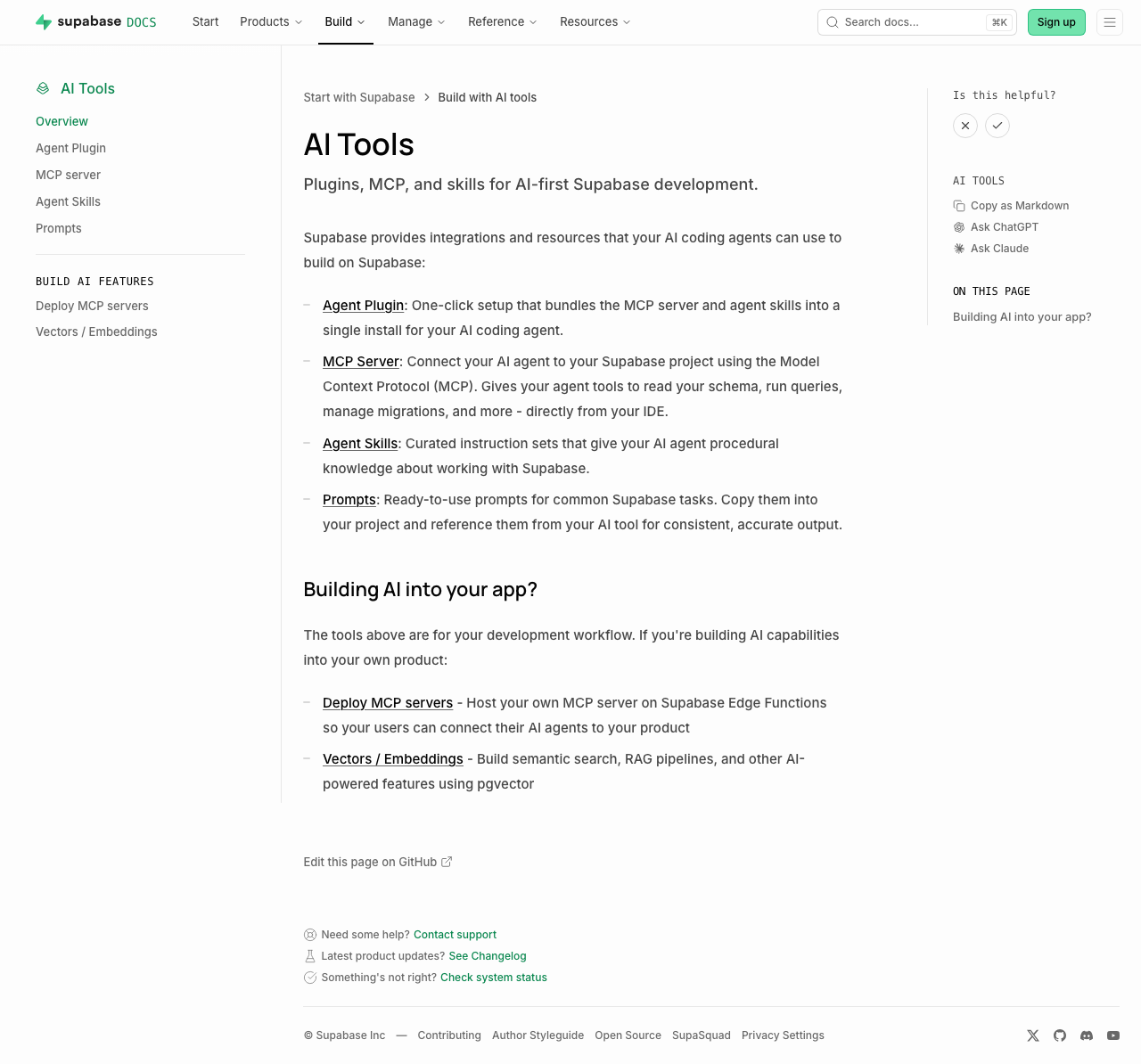 | 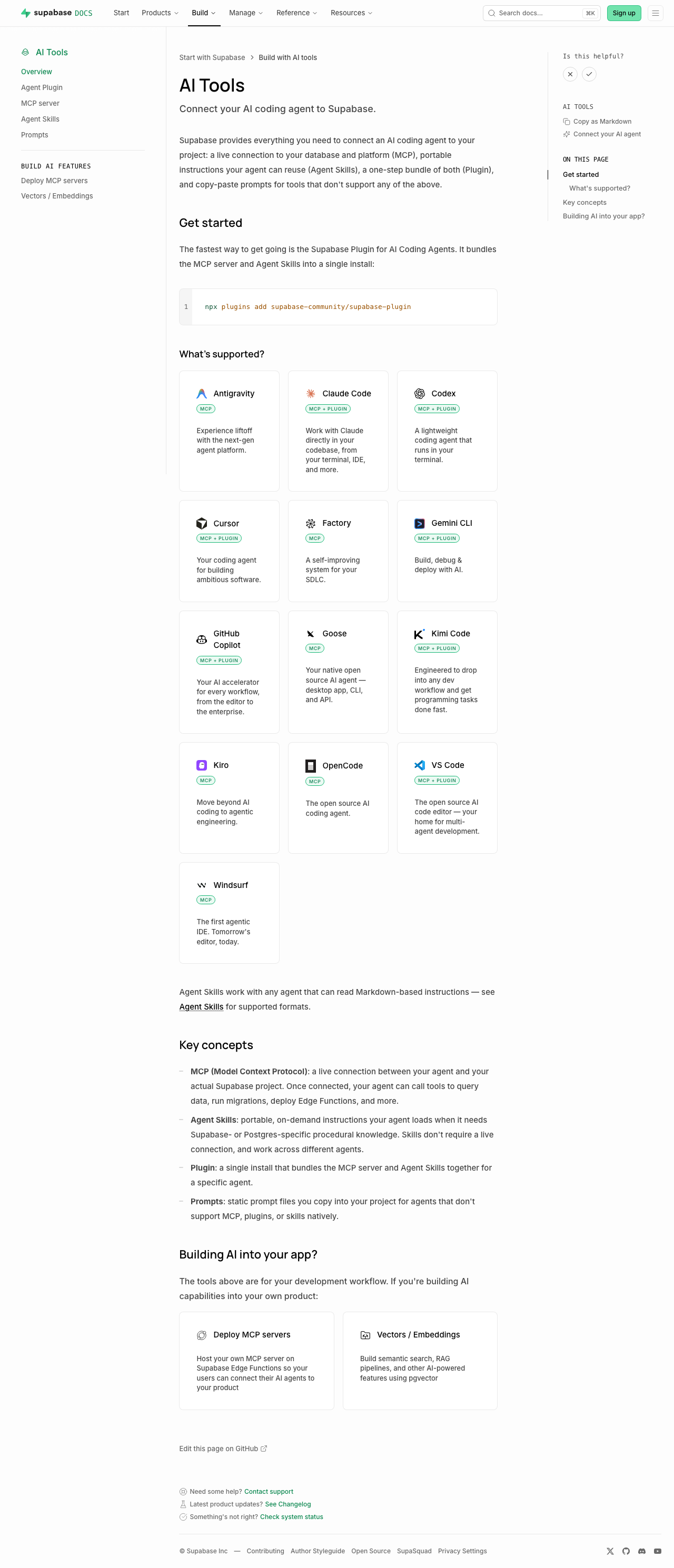 | Sub-pages each just add a one-line "Quick start" callout under the intro (no other layout change): [plugins](https://supabase.com/docs/guides/ai-tools/plugins) ([preview](https://docs-git-nikrichers-docs-1201-make-guidesai-too-7c7493-supabase.vercel.app/docs/guides/ai-tools/plugins)) · [mcp](https://supabase.com/docs/guides/ai-tools/mcp) ([preview](https://docs-git-nikrichers-docs-1201-make-guidesai-too-7c7493-supabase.vercel.app/docs/guides/ai-tools/mcp)) · [ai-skills](https://supabase.com/docs/guides/ai-tools/ai-skills) ([preview](https://docs-git-nikrichers-docs-1201-make-guidesai-too-7c7493-supabase.vercel.app/docs/guides/ai-tools/ai-skills)). ### Test plan - [x] `/guides/ai-tools` renders callout → card grid → concepts → Building AI into your app, in order - [x] Card grid: one card per agent (no duplicate Copilot), Windsurf present, icons clean in both themes, taglines shown, badges below title - [x] Sidebar shows "Connect your AI agent"; self-hosting's "Official" badge unaffected - [x] `.md` route still serves clean markdown; no lingering `ask_ai_clicked`, ChatGPT/Claude icon, or `SupportedAgentsTable` references --------- Co-authored-by: Nik Richers <nik@validmind.ai>


263 lines
8.9 KiB
TypeScript
263 lines
8.9 KiB
TypeScript
'use client'
|
|
|
|
import { ExternalLink } from 'lucide-react'
|
|
import { useTheme } from 'next-themes'
|
|
import { useState } from 'react'
|
|
import { CodeBlock } from 'ui-patterns/CodeBlock'
|
|
import { ClientSelectDropdown } from 'ui-patterns/McpUrlBuilder'
|
|
|
|
import { PLUGIN_CLIENTS, type PluginClient } from './AgentPluginsPanel.data'
|
|
|
|
function PluginInstructions({ client }: { client: PluginClient }) {
|
|
if (client.key === 'claude-code') {
|
|
return (
|
|
<div className="space-y-3">
|
|
<p className="text-sm text-foreground-light">
|
|
Install the Supabase plugin from the{' '}
|
|
<a
|
|
href="https://claude.com/plugins/supabase"
|
|
target="_blank"
|
|
rel="noopener noreferrer"
|
|
className="text-brand-link hover:underline"
|
|
>
|
|
official Anthropic marketplace
|
|
</a>
|
|
</p>
|
|
<CodeBlock
|
|
value={`claude plugin marketplace add anthropics/claude-plugins-official\nclaude plugin install supabase@claude-plugins-official`}
|
|
language="bash"
|
|
focusable={false}
|
|
className="block"
|
|
/>
|
|
<p className="text-xs text-foreground-lighter">
|
|
After installing, run <code>/reload-plugins</code> inside Claude Code to activate the
|
|
plugin.
|
|
</p>
|
|
<p className="text-xs text-foreground-lighter">
|
|
Installs with <code>--scope user</code> by default, making it available across all your
|
|
projects. Use <code>--scope project</code> to track it in source control — useful for
|
|
teams where all contributors and cloud agents should follow the same Supabase guidance.
|
|
</p>
|
|
</div>
|
|
)
|
|
}
|
|
|
|
if (client.key === 'codex') {
|
|
return (
|
|
<div className="space-y-4">
|
|
<div className="space-y-2">
|
|
<h4 className="text-sm font-medium">Desktop app</h4>
|
|
<p className="text-xs text-foreground-lighter">
|
|
Install the Supabase plugin directly from the{' '}
|
|
<a
|
|
href="https://developers.openai.com/codex/plugins#plugin-directory-in-the-codex-app"
|
|
target="_blank"
|
|
rel="noopener noreferrer"
|
|
className="text-brand-link hover:underline"
|
|
>
|
|
Codex desktop app plugin directory
|
|
</a>
|
|
.
|
|
</p>
|
|
</div>
|
|
<div className="space-y-2">
|
|
<h4 className="text-sm font-medium">CLI</h4>
|
|
<p className="text-xs text-foreground-lighter">Open the Codex CLI by running</p>
|
|
<CodeBlock value="codex" language="bash" focusable={false} className="block" />
|
|
<p className="text-xs text-foreground-lighter">Inside Codex, type:</p>
|
|
<CodeBlock value="/plugins" language="bash" focusable={false} className="block" />
|
|
<p className="text-xs text-foreground-lighter">
|
|
Search for <strong>Supabase</strong> and select <strong>Install plugin</strong>.
|
|
</p>
|
|
</div>
|
|
</div>
|
|
)
|
|
}
|
|
|
|
if (client.key === 'cursor') {
|
|
return (
|
|
<div className="space-y-3">
|
|
<p className="text-sm text-foreground-light">
|
|
In the Cursor desktop or web app, type the following in the chat to install the{' '}
|
|
<a
|
|
href="https://cursor.com/marketplace/supabase"
|
|
target="_blank"
|
|
rel="noopener noreferrer"
|
|
className="text-brand-link hover:underline"
|
|
>
|
|
Supabase
|
|
</a>{' '}
|
|
plugin from the Cursor plugin marketplace
|
|
</p>
|
|
<CodeBlock
|
|
value="/add-plugin supabase"
|
|
language="bash"
|
|
focusable={false}
|
|
className="block"
|
|
/>
|
|
</div>
|
|
)
|
|
}
|
|
|
|
if (client.key === 'gemini-cli') {
|
|
return (
|
|
<div className="space-y-3">
|
|
<p className="text-sm text-foreground-light">
|
|
Install the official Supabase extension for Gemini CLI by running the following command in
|
|
your terminal.
|
|
</p>
|
|
<CodeBlock
|
|
value="gemini extensions install https://github.com/supabase-community/supabase-plugin"
|
|
language="bash"
|
|
focusable={false}
|
|
className="block"
|
|
/>
|
|
<p className="text-xs text-foreground-lighter">
|
|
You can also find the extension in the{' '}
|
|
<a
|
|
href="https://geminicli.com/extensions/?name=supabase-communitysupabase-plugin"
|
|
target="_blank"
|
|
rel="noopener noreferrer"
|
|
className="text-brand-link hover:underline"
|
|
>
|
|
Gemini CLI extensions directory
|
|
</a>
|
|
.
|
|
</p>
|
|
</div>
|
|
)
|
|
}
|
|
|
|
if (client.key === 'kimi') {
|
|
return (
|
|
<div className="space-y-3">
|
|
<p className="text-sm text-foreground-light">Open Kimi Code by running</p>
|
|
<CodeBlock value="kimi" language="bash" focusable={false} className="block" />
|
|
<p className="text-sm text-foreground-light">
|
|
Then install the Supabase plugin from within the session:
|
|
</p>
|
|
<CodeBlock
|
|
value="/plugins install https://github.com/supabase-community/supabase-plugin"
|
|
language="bash"
|
|
focusable={false}
|
|
className="block"
|
|
/>
|
|
<p className="text-xs text-foreground-lighter">
|
|
Confirm the trust prompt to install. Kimi adds the plugin to its native plugin store. Run{' '}
|
|
<code>/plugins</code> at any time to view or reload installed plugins.
|
|
</p>
|
|
</div>
|
|
)
|
|
}
|
|
|
|
if (client.key === 'vscode') {
|
|
return (
|
|
<div className="space-y-3">
|
|
<p className="text-sm text-foreground-light">
|
|
Open the Command Palette (<code>Cmd/Ctrl+Shift+P</code>) and run{' '}
|
|
<strong>Chat: Install Plugin From Source</strong>, then paste the Supabase plugin
|
|
repository URL:
|
|
</p>
|
|
<CodeBlock
|
|
value="https://github.com/supabase-community/supabase-plugin"
|
|
language="bash"
|
|
focusable={false}
|
|
className="block"
|
|
/>
|
|
<p className="text-xs text-foreground-lighter">
|
|
VS Code auto-detects the vendor-neutral{' '}
|
|
<a
|
|
href="https://github.com/vercel-labs/open-plugin-spec"
|
|
target="_blank"
|
|
rel="noopener noreferrer"
|
|
className="text-brand-link hover:underline"
|
|
>
|
|
Open Plugin
|
|
</a>{' '}
|
|
manifest in the repo. Review the trust prompt to finish installing.
|
|
</p>
|
|
</div>
|
|
)
|
|
}
|
|
|
|
if (client.key === 'github-copilot') {
|
|
return (
|
|
<div className="space-y-4">
|
|
<div className="space-y-2">
|
|
<h4 className="text-sm font-medium">From GitHub</h4>
|
|
<p className="text-xs text-foreground-lighter">
|
|
Install the Supabase plugin directly from the{' '}
|
|
<a
|
|
href="https://github.com/supabase-community/supabase-plugin"
|
|
target="_blank"
|
|
rel="noopener noreferrer"
|
|
className="text-brand-link hover:underline"
|
|
>
|
|
GitHub repository
|
|
</a>
|
|
.
|
|
</p>
|
|
<CodeBlock
|
|
value="copilot plugin install supabase-community/supabase-plugin"
|
|
language="bash"
|
|
focusable={false}
|
|
className="block"
|
|
/>
|
|
</div>
|
|
</div>
|
|
)
|
|
}
|
|
|
|
return null
|
|
}
|
|
|
|
export function AgentPluginsPanel() {
|
|
const [selectedClientKey, setSelectedClientKey] = useState(PLUGIN_CLIENTS[0].key)
|
|
const { resolvedTheme } = useTheme()
|
|
|
|
const theme = (resolvedTheme as 'light' | 'dark') ?? 'light'
|
|
const selectedClient =
|
|
PLUGIN_CLIENTS.find((c) => c.key === selectedClientKey) ?? PLUGIN_CLIENTS[0]
|
|
|
|
return (
|
|
<div className="not-prose">
|
|
<ClientSelectDropdown
|
|
theme={theme}
|
|
clients={PLUGIN_CLIENTS}
|
|
selectedClient={selectedClient}
|
|
onClientChange={setSelectedClientKey}
|
|
/>
|
|
<div className="mt-4 rounded-lg border border-muted p-4">
|
|
<PluginInstructions client={selectedClient} />
|
|
</div>
|
|
<div className="mt-3 flex flex-col gap-1 text-xs text-foreground-light">
|
|
{selectedClient.docsUrl && (
|
|
<div className="flex items-center gap-2">
|
|
<span>Need help?</span>
|
|
<a
|
|
href={selectedClient.docsUrl}
|
|
target="_blank"
|
|
rel="noopener noreferrer"
|
|
className="text-brand-link hover:underline inline-flex items-center"
|
|
>
|
|
View {selectedClient.label} extensions docs
|
|
<ExternalLink className="h-3 w-3 ml-1" />
|
|
</a>
|
|
</div>
|
|
)}
|
|
{selectedClient.repoUrl && (
|
|
<a
|
|
href={selectedClient.repoUrl}
|
|
target="_blank"
|
|
rel="noopener noreferrer"
|
|
className="text-brand-link hover:underline inline-flex items-center"
|
|
>
|
|
Give feedback
|
|
<ExternalLink className="h-3 w-3 ml-1" />
|
|
</a>
|
|
)}
|
|
</div>
|
|
</div>
|
|
)
|
|
}
|