
Live Tracker Map [WIP]
Build with supabase auth, realtime and leafletjs. [Demo App]
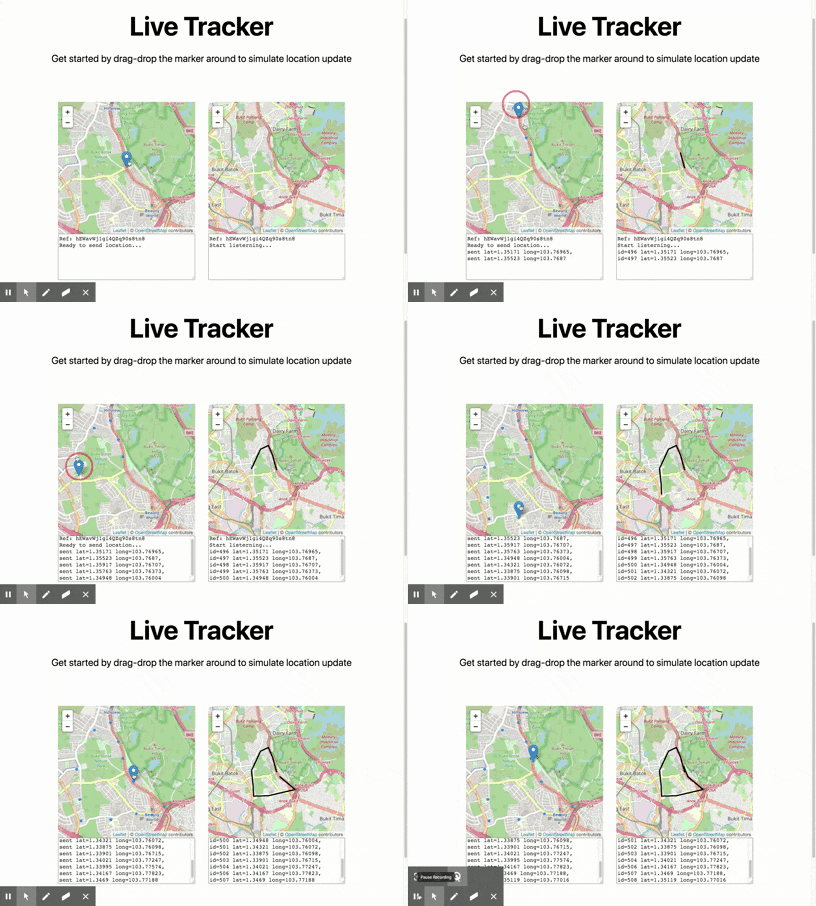
How to use
Clone this folder
git clone https://github.com/supabase/supabase
cd supabase/examples/live-tracker-map
Install dependencies
npm install
Start the app
# Open a terminal and run:
npm run dev
Visit http://localhost:3000 and start testing!
Test with your own Supabase Project
Database schema
Go to app.supabase.io, create a new organisation and project if you haven't had one.
Run this sql query to create required tables.
-- USERS
CREATE TYPE public.user_role AS ENUM ('DRIVER', 'MANAGER');
CREATE TABLE public.users (
  id uuid NOT NULL PRIMARY KEY, -- UUID from auth.users
  username text,
  role user_role DEFAULT 'DRIVER'::public.user_role
);
COMMENT ON table public.users IS 'Profile data for each user.';
COMMENT ON column public.users.id IS 'References the internal Supabase Auth user.';
ALTER TABLE public.users REPLICA IDENTITY FULL; -- Send "previous data" on change
ALTER TABLE public.users ENABLE ROW LEVEL SECURITY;
CREATE POLICY "Allow logged-in read access" on public.users FOR SELECT USING ( auth.role() = 'authenticated' );
CREATE POLICY "Allow individual insert access" on public.users FOR INSERT WITH CHECK ( auth.uid() = id );
CREATE POLICY "Allow individual update access" on public.users FOR UPDATE USING ( auth.uid() = id );

-- LOCATIONS
CREATE TABLE public.locations (
  id bigint GENERATED BY DEFAULT AS IDENTITY PRIMARY KEY,
  latitude numeric NOT NULL,
  longitude numeric NOT NULL,
  user_id uuid REFERENCES public.users NOT NULL
);
ALTER TABLE public.locations REPLICA IDENTITY FULL; -- Send "previous data" on change
ALTER TABLE public.locations ENABLE ROW LEVEL SECURITY;
COMMENT ON table public.locations IS 'Individual locations sent by each user.';
CREATE POLICY "Allow logged-in read access" on public.locations USING ( auth.role() = 'authenticated' );
CREATE POLICY "Allow individual insert access" on public.locations FOR INSERT WITH CHECK ( auth.uid() = user_id );
Setup env vars
Next, copy the .env.local.example file in this directory to .env.local (which will be ignored by Git):
cp .env.local.example .env.local
Then set each variable on .env.local:
NEXT_PUBLIC_SUPABASE_ENDPOINTshould be the API URLNEXT_PUBLIC_SUPABASE_APIKEYshould be the anon key
You can get these values from your project dashboard at app.supabase.io.
The anon key is your client-side API key. It allows "anonymous access" to your database, until the user has logged in. Once they have logged in, the keys will switch to the user's own login token. This enables row level security for your data.
NOTE: The
service_rolekey has full access to your data, bypassing any security policies. These keys have to be kept secret and are meant to be used in server environments and never on a client or browser.