 Nik RichersandNik Richers
032a368221
Nik RichersandNik Richers
032a368221
## I have read the CONTRIBUTING.md file.
YES

## What kind of change does this PR introduce?
Bug fix, docs update

Closes DOCS-353.

## What is the current behavior?
- Linear item: Overhaul Ionic Vue tutorial
- Debug email shown on login page after submit
- Login redirect / route guard issues
- Email missing on account page
- HTML5 `type="url"` blocks profile update for `example.com`
- Tutorial `.env` used `VUE_APP_SUPABASE_KEY` but app expects
`VUE_APP_SUPABASE_PUBLISHABLE_KEY`

## What is the new behavior?
- Removed debug `<p>{{ email }}</p>` from Login.vue
- Route guards in `router/index.ts`; simplified App.vue user sync
- Account email from `getClaims()`; website `type="text"`;
`useIonRouter` for logout
- Store typed as `User | null`
- Tutorial MDX env var fixed
- Audit skills moved to
[supabase/docs-agent-skills](https://github.com/supabase/docs-agent-skills):
[`audit-ionic-vue-tutorial`](https://github.com/supabase/docs-agent-skills/blob/main/.claude/skills/audit-ionic-vue-tutorial/SKILL.md),
[`audit-docs-tutorials`](https://github.com/supabase/docs-agent-skills/blob/main/.claude/skills/audit-docs-tutorials/SKILL.md)
— both require **live Supabase platform** E2E (not just build/lint)

**Tutorial preview:** [Build a User Management App with Ionic
Vue](https://supabase.com/docs/guides/getting-started/tutorials/with-ionic-vue)


## Additional context
- Verification (author): `npm install && npm run build` — **pass**
(warnings only)
- E2E: profiles migration applied to project `moijyfpvgnmgoxvwcikq`; add
`.env` from `.env.example` with publishable key for full auth flow test

### Test plan
- [ ] `cd examples/user-management/ionic-vue-user-management && npm
install && npm run build`
- [ ] Confirm tutorial MDX `.env` uses
`VUE_APP_SUPABASE_PUBLISHABLE_KEY`
- [ ] Copy Project URL + publishable key into `.env`
- [ ] `npm run dev` — login page shows no email after magic-link submit
- [ ] Magic link redirects to `/account`
- [ ] Email displays on account page
- [ ] Update profile with `example.com` and `https://example.com` — both
save
- [ ] Logout returns to `/`; `/account` blocked without auth
- [ ] Install audit skills from
[docs-agent-skills](https://github.com/supabase/docs-agent-skills) (`ln
-sf
~/GitHub/supabase/docs-agent-skills/.claude/skills/audit-ionic-vue-tutorial
~/.claude/skills/audit-ionic-vue-tutorial` and same for
`audit-docs-tutorials`), then run
[audit-ionic-vue-tutorial](https://github.com/supabase/docs-agent-skills/blob/main/.claude/skills/audit-ionic-vue-tutorial/SKILL.md)
platform E2E (magic link, profile update verified via SQL)
- [ ] Run
[audit-docs-tutorials](https://github.com/supabase/docs-agent-skills/blob/main/.claude/skills/audit-docs-tutorials/SKILL.md)
— confirm platform E2E column is filled for with-ionic-vue


<!-- This is an auto-generated comment: release notes by coderabbit.ai
-->

## Summary by CodeRabbit

* **New Features**
* Improved authentication handling in the Ionic Vue user-management
example, with smoother sign-in/sign-out redirects and account access
checks.
  * Updated account details to display the user’s email more reliably.

* **Bug Fixes**
* Adjusted navigation so authenticated users are routed to the account
page and unauthenticated users are sent back to the home page.

* **Documentation**
* Updated setup instructions and example environment variables for the
Supabase integration.

<!-- end of auto-generated comment: release notes by coderabbit.ai -->

---------

Co-authored-by: Nik Richers <nik@validmind.ai>
5.2 KiB
Supabase Ionic Vue User Management
This project is based on the Supabase Ionic Vue user management Quickstart To keep it in sync with this Quickstart, architecture choices have been made to facilitate the comparison
This example will set you up for a very common situation: users can sign up with a magic link and then update their account with profile information, including a profile image.
This demonstrates how to use:
Technologies used
- Frontend:
- Ionic
- Capacitor
- Vue
- Supabase.js for user management and realtime data syncing.
- Backend:
- app.supabase.io: hosted Postgres database with restful API for usage with Supabase.js.
Instant deploy
The Vercel deployment will guide you through creating a Supabase account and project. After installation of the Supabase integration, all relevant environment variables will be set up so that the project is usable immediately after deployment 🚀.
Build from scratch
1. Create new project
Sign up to Supabase - https://app.supabase.io and create a new project. Wait for your database to start.
2. Run "User Management" Quickstart
Once your database has started, run the "User Management Starter" quickstart. Inside of your project, enter the SQL editor tab and scroll down until you see User Management Starter: Set up a Public Profiles table which you can access with your API.
3. Get the URL and Key
Go to the Project Settings (the cog icon), open the API tab, and find your API URL and anon key, you'll need these in the next step.
The anon key is your client-side API key. It allows "anonymous access" to your database, until the user has logged in. Once they have logged in, the keys will switch to the user's own login token. This enables row level security for your data. Read more about this below.
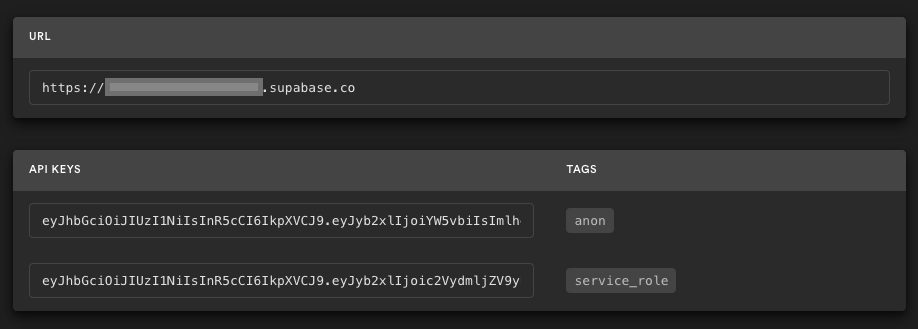
NOTE: The secret key has full access to your data, bypassing any security policies. These keys have to be kept secret and are meant to be used in server environments and never on a client or browser.
4. Env vars
Update your environment file environment.ts
export const environment = {
  // ...
  supabaseUrl: "YOUR_SUPABASE_URL",
  supabaseKey: "YOUR_SUPABASE_KEY"
};
Populate this file with your URL and Key.
5. Run the application
Run the application: ionic serve and the browser will open to https://localhost:8100/ and you are ready to go 🚀.
Supabase details
Postgres Row level security
This project uses very high-level Authorization using Postgres' Role Level Security.
When you start a Postgres database on Supabase, we populate it with an auth schema, and some helper functions.
When a user logs in, they are issued a JWT with the role authenticated and their UUID.
We can use these details to provide fine-grained control over what each user can and cannot do.
This is a trimmed-down schema, with the policies:
-- Create a table for Public Profiles
create table profiles (
  id uuid references auth.users not null,
  updated_at timestamp with time zone,
  username text unique,
  avatar_url text,
  website text,

  primary key (id),
  unique(username),
  constraint username_length check (char_length(username) >= 3)
);

alter table profiles enable row level security;

create policy "Public profiles are viewable by everyone."
  on profiles for select
  using ( true );

create policy "Users can insert their own profile."
  on profiles for insert
  with check ( auth.uid() = id );

create policy "Users can update own profile."
  on profiles for update
  using ( auth.uid() = id );

-- Set up Realtime!
begin;
  drop publication if exists supabase_realtime;
  create publication supabase_realtime;
commit;
alter publication supabase_realtime add table profiles;

-- Set up Storage!
insert into storage.buckets (id, name)
values ('avatars', 'avatars');

create policy "Avatar images are publicly accessible."
  on storage.objects for select
  using ( bucket_id = 'avatars' );

create policy "Anyone can upload an avatar."
  on storage.objects for insert
  with check ( bucket_id = 'avatars' );
Authors
Supabase is open source. We'd love for you to follow along and get involved at https://github.com/supabase/supabase