# Build a User Management App with React
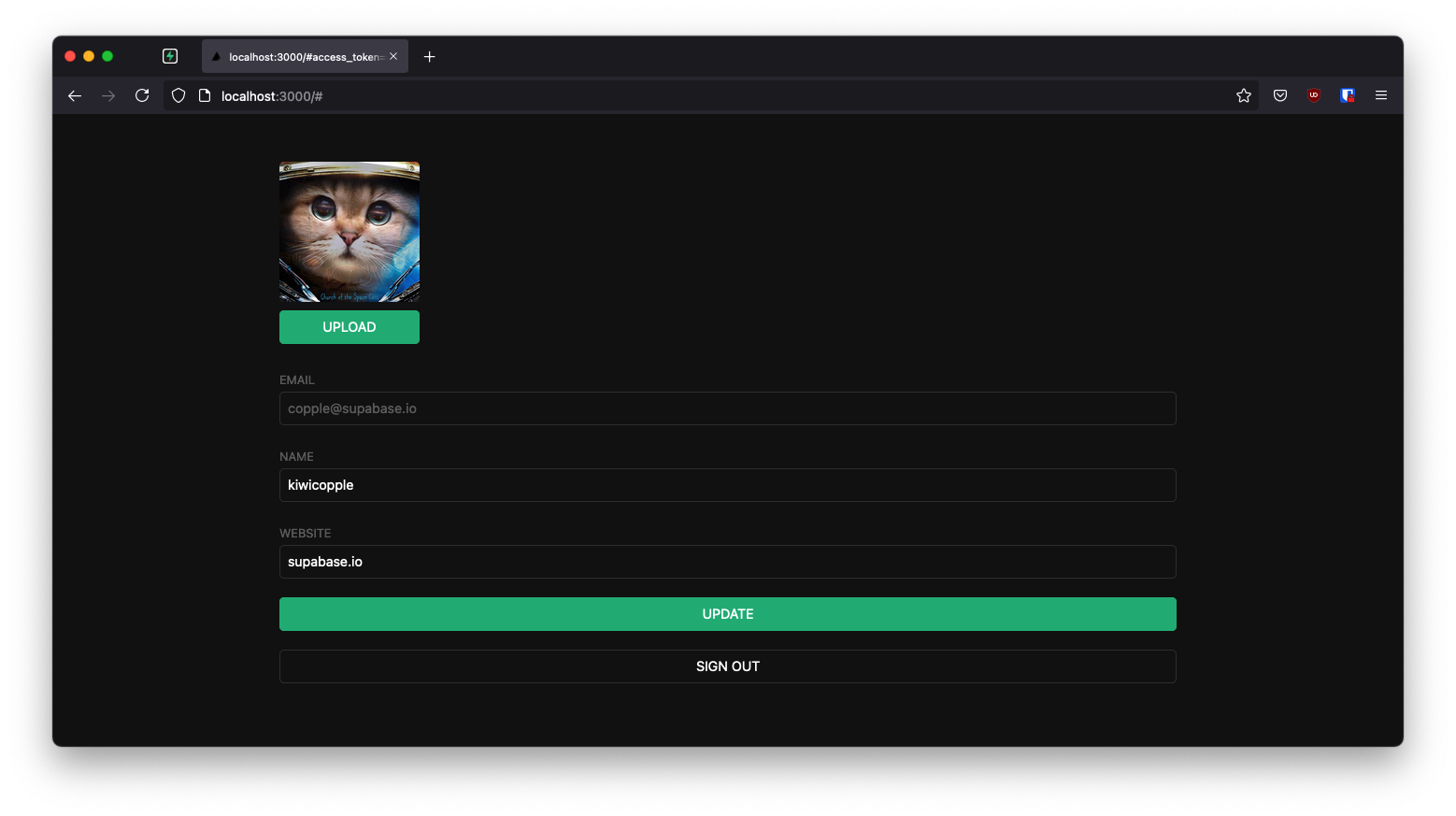
This example demonstrates how to build a user management app with React and Supabase. Users can sign up with a magic link and then update their account with public profile information, including a profile image.
## Features
This app demonstrates how to use:
- User signups using Supabase [Auth](https://supabase.com/auth) with Magic Links
- User avatar images using Supabase [Storage](https://supabase.com/storage)
- Public profiles restricted with [Row Level Security](https://supabase.com/docs/guides/auth#row-level-security)
- Frontend using [Vite](https://vitejs.dev/) and React
- The [`getUser()`](https://supabase.com/docs/reference/javascript/auth-getuser) method to fetch current user details
## Technologies Used
- **Frontend:**
- [Vite](https://vitejs.dev/) - Fast React development toolchain
- [Supabase.js](https://supabase.com/docs/library/getting-started) - For user management and data syncing
- **Backend:**
- [Supabase](https://supabase.com/dashboard) - Hosted Postgres database with RESTful API
## Getting Started
### Prerequisites
Before you begin, make sure you have:
- A Supabase account ([sign up here](https://supabase.com/dashboard))
- Node.js installed on your machine
### 1. Create a Supabase Project
1. Sign in to [Supabase Dashboard](https://supabase.com/dashboard)
2. Create a new project
3. Wait for your database to start
### 2. Set Up the Database
Once your database has started:
1. Go to the **SQL Editor** in your project dashboard
2. Scroll down to find **"User Management Starter"** quickstart
3. Click it and then click **RUN** to execute the query
4. This will create a `profiles` table - verify it in the **Table Editor**
The quickstart creates the following schema:
```sql
-- Create a table for Public Profiles
create table profiles (
id uuid references auth.users not null,
updated_at timestamp with time zone,
username text unique,
avatar_url text,
website text,
primary key (id),
unique (username),
constraint username_length check (char_length(username) >= 3)
);
alter table profiles enable row level security;
create policy "Public profiles are viewable by everyone."
on profiles for select using (true);
create policy "Users can insert their own profile."
on profiles for insert with check ((select auth.uid()) = id);
create policy "Users can update own profile."
on profiles for update using ((select auth.uid()) = id);
-- Set up Storage for avatars
insert into storage.buckets (id, name) values ('avatars', 'avatars');
create policy "Avatar images are publicly accessible."
on storage.objects for select using (bucket_id = 'avatars');
create policy "Anyone can upload an avatar."
on storage.objects for insert with check (bucket_id = 'avatars');
```
### 3. Get Your API Credentials
1. Go to **Project Settings** (the cog icon)
2. Open the **API** tab
3. Copy your **Project URL** and **anon/public key**
### 4. Configure Environment Variables
Create a `.env.local` file in the project root:
```bash
VITE_SUPABASE_URL=YOUR_SUPABASE_URL
VITE_SUPABASE_PUBLISHABLE_KEY=YOUR_SUPABASE_PUBLISHABLE_KEY
```
Replace the values with your actual Project URL and key.
### 5. Install Dependencies
```bash
npm install
```
### 6. Run the Application
```bash
npm run dev
```
Open your browser to [http://localhost:5173](http://localhost:5173) 🚀
## Building from Scratch
If you want to build this app from scratch, follow these steps:
### Initialize a React App
Use [Vite](https://vitejs.dev/guide/) to create a new React app:
```bash
npm create vite@latest supabase-react -- --template react
cd supabase-react
```
### Install Supabase
Install the Supabase JavaScript client:
```bash
npm install @supabase/supabase-js
```
### Set Up Environment Variables
Create a `.env.local` file with your Supabase credentials (see step 4 above).
### Create the Supabase Client
Create `src/supabaseClient.js`:
```javascript
import { createClient } from '@supabase/supabase-js'
const supabaseUrl = import.meta.env.VITE_SUPABASE_URL
const supabasePublishableKey = import.meta.env.VITE_SUPABASE_PUBLISHABLE_KEY
export const supabase = createClient(supabaseUrl, supabasePublishableKey)
```
This initializes the Supabase client with your project credentials. These variables are exposed in the browser, which is fine because Row Level Security protects your data.
### Optional: Add Styling
Update `src/index.css` to style the app. You can find the full CSS file [here](https://raw.githubusercontent.com/supabase/supabase/master/examples/user-management/react-user-management/src/index.css).
## Application Structure
### Authentication Component (`src/Auth.jsx`)
Handles user login with Magic Links - users can sign in with their email without passwords:
```javascript
import { useState } from 'react'
import { supabase } from './supabaseClient'
export default function Auth() {
const [loading, setLoading] = useState(false)
const [email, setEmail] = useState('')
const handleLogin = async (event) => {
event.preventDefault()
setLoading(true)
const { error } = await supabase.auth.signInWithOtp({ email })
if (error) {
alert(error.error_description || error.message)
} else {
alert('Check your email for the login link!')
}
setLoading(false)
}
return (
Supabase + React
Sign in via magic link with your email below
)
}
```
### Avatar Upload Component (`src/Avatar.jsx`)
Manages profile photo uploads using Supabase Storage:
- Downloads existing avatar images
- Handles file uploads to the `avatars` bucket
- Provides visual feedback during upload
See the full component in [`src/Avatar.jsx`](src/Avatar.jsx).
### Account Management Component (`src/Account.jsx`)
Allows users to view and edit their profile:
- Fetches user profile data from the `profiles` table
- Updates profile information (username, website, avatar)
- Displays the current user's email
- Provides sign-out functionality
Key features:
- Uses the `user` prop (not `session`) passed from the parent component
- Implements proper cleanup with the `ignore` flag to prevent race conditions
- Updates profile data with `upsert` to handle both inserts and updates
See the full component in [`src/Account.jsx`](src/Account.jsx).
### Main App Component (`src/App.jsx`)
The root component that manages authentication state:
```javascript
import { useState, useEffect } from 'react'
import './App.css'
import { supabase } from './supabaseClient'
import Auth from './Auth'
import Account from './Account'
function App() {
const [user, setUser] = useState(null)
useEffect(() => {
// Get initial user on mount
supabase.auth.getUser().then(({ data: { user } }) => {
setUser(user)
})
// Listen for auth changes
supabase.auth.onAuthStateChange(async () => {
const {
data: { user },
} = await supabase.auth.getUser()
setUser(user)
})
}, [])
return (
{!user ? : }
)
}
export default App
```
**Important:** This component uses the [`getUser()`](https://supabase.com/docs/reference/javascript/auth-getuser) method instead of `getSession()`. The `getUser()` method:
- Performs a network request to the Supabase Auth server
- Validates the current session on the server side
- Returns the most up-to-date user information
- Is more reliable than reading from local storage
## Understanding Row Level Security
This project uses Postgres Row Level Security to provide fine-grained authorization:
- When a user logs in, they receive a JWT with the role `authenticated` and their UUID
- These details enable precise control over what each user can access
- The policies ensure:
- All profiles are viewable by everyone
- Users can only insert their own profile
- Users can only update their own profile
- Avatar images are publicly accessible
- Any authenticated user can upload an avatar
This approach keeps your data secure while maintaining a simple client-side implementation.
## Project Files
```
react-user-management/
├── src/
│ ├── App.jsx # Main app component with auth state
│ ├── Auth.jsx # Login component with Magic Links
│ ├── Account.jsx # Profile management component
│ ├── Avatar.jsx # Avatar upload component
│ ├── supabaseClient.js # Supabase client initialization
│ ├── App.css # App styles
│ └── index.css # Global styles
├── .env.local # Environment variables (create this)
├── package.json
└── vite.config.js
```
## Learn More
- [Supabase Documentation](https://supabase.com/docs)
- [Supabase Auth](https://supabase.com/docs/guides/auth)
- [Supabase Storage](https://supabase.com/docs/guides/storage)
- [Row Level Security](https://supabase.com/docs/guides/auth#row-level-security)
- [React Documentation](https://react.dev/)
- [Vite Documentation](https://vitejs.dev/)
## Troubleshooting
**Magic link not working?**
- Check your email spam folder
- Verify your site URL is configured correctly in Supabase Dashboard → Authentication → URL Configuration
**Images not uploading?**
- Ensure the `avatars` bucket exists in Storage
- Check that storage policies are correctly set up
**Profile not updating?**
- Verify the `profiles` table exists
- Check that Row Level Security policies are active
## Authors
- [Supabase](https://supabase.com)
Supabase is open source. We'd love for you to follow along and get involved at [github.com/supabase/supabase](https://github.com/supabase/supabase)