mirror of
https://github.com/supabase/supabase.git
synced 2026-10-06 01:45:10 +03:00
ab9ccf00a3420f7aa12e552d578e1118c19ccdb5
3
Commits
| Author | SHA1 | Message | Date | |
|---|---|---|---|---|
 Pedro Rodrigues Pedro Rodrigues
|
16046a0139 |
docs: add omp (oh-my-pi) to supported clients in MCP and plugin guides (#50045)
## What this does

Adds **omp** (oh-my-pi) across the Supabase AI-tools docs.

- **Plugin docs** (`AgentPluginsPanel`) — omp client + Anthropic
marketplace install: `omp plugin marketplace add
anthropics/claude-plugins-official`, then `omp plugin install
supabase@claude-plugins-official`.
- **MCP docs** (`McpUrlBuilder`) — omp under "AI Agent CLI":
`.omp/mcp.json` / `~/.omp/agent/mcp.json` (JSON), `/mcp add` guided
setup, project vs user scope.
- **"Pick your agent" grid** — add the omp logo and tagline ("A coding
agent with the IDE wired in.").

No CLI command mapping entry — omp has no `omp mcp …` subcommand, so the
page documents file-based setup (`/mcp add` wizard or direct JSON edit).
Matches other file-configured clients like kiro.

## Testing

Verified against omp 18.1.11: written `.omp/mcp.json` parsed by runtime,
`/mcp list` shows server connected; `omp plugin marketplace add/install
supabase@claude-plugins-official` works; `omp plugin list` confirms
installed.

## Preview

### Agent Plugin page

<img width="1128" height="706" alt="image"
src="https://github.com/user-attachments/assets/1f06895b-2d45-4b64-b9ab-c1670201c370"
/>


### MCP page

<img width="1128" height="706" alt="image"
src="https://github.com/user-attachments/assets/30a9a823-0e78-4c3b-aeeb-3a6a7aa40ed6"
/>


### AI Tools main page

<img width="1128" height="706" alt="image"
src="https://github.com/user-attachments/assets/064a3234-9f4d-4f0a-9598-fbb2a465266f"
/>


Closes AI-1184

<!-- This is an auto-generated comment: release notes by coderabbit.ai
-->

## Summary by CodeRabbit

- **New Features**
- Added OMP as a supported AI coding agent across documentation and
integrations.
- Added OMP installation guidance, including marketplace setup, scope
options, session reloads, and authentication.
  - Added support for configuring the Supabase MCP server through OMP.
- Added OMP branding, icon, tagline, repository, and documentation
links.

<!-- end of auto-generated comment: release notes by coderabbit.ai -->
|
||
|
Pedro RodriguesandClaude Opus 4.8
|
d3146a1755 |
docs: add Grok plugin and MCP install instructions (#49212)
## What this does Adds **Grok** (Grok Build) across the Supabase AI-tools docs, and fixes two logo gaps. - **Plugin docs** (`AgentPluginsPanel`) — Grok client + `grok plugin install …` / in-session `/plugins` steps. - **MCP docs** (`McpUrlBuilder`) — Grok under "AI Agent CLI": `~/.grok/config.toml` (`[mcp_servers.supabase]`), `grok mcp add … --transport http`, OAuth steps. - **"Pick your agent" grid** — add the Grok logo, and fix **Warp**'s pre-existing missing logo (both were absent from the grid's `ICON_ASSETS` map). - **Fix**: the plugins-page Cursor entry was missing `hasDistinctDarkIcon`, so its dark-mode logo fell back to the light mark — aligned with the MCP list. - Adds Grok + Warp agent logos (light + dark). ## Testing Verified against grok `1.0.5`: `grok plugin install …` works; the generated `config.toml` and `grok mcp add` command are both parsed by `grok mcp list`. Pairs with supabase-community/supabase-plugin#45 (the `.grok-plugin` surface); merge after that lands. ## Preview [Agent Plugin page](https://docs-git-pedrorodrigues-ai-932-add-grok-agent-p-12402b-supabase.vercel.app/docs/guides/ai-tools/plugins#manual-installation) <img width="877" height="378" alt="image" src="https://github.com/user-attachments/assets/8fd9e112-5c11-412b-bd8c-611912043e6d" /> [MCP page](https://docs-git-pedrorodrigues-ai-932-add-grok-agent-p-12402b-supabase.vercel.app/docs/guides/ai-tools/mcp#remote-mcp-installation) <img width="877" height="513" alt="image" src="https://github.com/user-attachments/assets/459de070-5049-433a-929f-9902222e157d" /> [AI Tools main page](https://docs-git-pedrorodrigues-ai-932-add-grok-agent-p-12402b-supabase.vercel.app/docs/guides/ai-tools#pick-your-agent) <img width="877" height="642" alt="image" src="https://github.com/user-attachments/assets/e6ca40d2-e9c9-466c-a837-dbda4bdc09f7" /> Closes AI-932, AI-974 <!-- This is an auto-generated comment: release notes by coderabbit.ai --> ## Summary by CodeRabbit ## New Features - Added Grok as a supported AI tool and MCP client. - Added Grok installation instructions, CLI setup, authentication, and connection verification guidance. - Added Grok icons for light and dark themes. - Added support for custom documentation link text in plugin panels. - Added Warp to the available icon assets. <!-- end of auto-generated comment: release notes by coderabbit.ai --> --------- Co-authored-by: Claude Opus 4.8 (1M context) <noreply@anthropic.com> |
||
|
Nik RichersandNik Richers
|
e0ecaadc21 |
docs: make AI tools section agent-first (#48167)
## I have read the [CONTRIBUTING.md](https://github.com/supabase/supabase/blob/master/CONTRIBUTING.md) file. YES ## What kind of change does this PR introduce? This PR reworks the `/guides/ai-tools` docs section to be agent-first. The overview now leads with the fastest path to a working setup (the plugin install command), a "What's supported?" card grid showing which coding agents and IDEs work via Plugin and/or MCP (with each product's own tagline, not a generated sentence), and a concepts glossary — instead of a plain four-item list. The sidebar "AI Tools" widget, shown on every guides page, now links to this hub ("Connect your AI agent") instead of opening a ChatGPT/Claude chat frontend. Closes DOCS-1201. ## What is the current behavior? - The `/guides/ai-tools` overview is a plain four-item bullet list with no getting-started path, compatibility info, or concepts explanation. - The sidebar "AI Tools" widget offers "Copy as Markdown", "Ask ChatGPT", and "Ask Claude" — the latter two send you to a chat frontend instead of agent setup. ## What is the new behavior? - `ai-tools.mdx`: intro → plugin install callout → "What's supported?" card grid (`<ContentListings id="ai-tools-supported-agents" />`, icon + tagline + Plugin/MCP badge per agent) → "Key concepts" glossary → "Building AI into your app?" (also converted to `ContentListings`). - New `data/content-listings/ai-tools.data.ts` builds the card grid from the existing `PLUGIN_CLIENTS`/`MCP_CLIENT_DATA` client lists (no new hand-maintained data) — fixing two latent bugs found along the way: GitHub Copilot was keyed differently between the two sources (would have produced duplicate cards), and Windsurf has no upstream docs URL (would have been silently dropped). - New opt-in `badgePosition` field on `ContentListingItem` so the badge renders under the title for the agent grid, without changing the one other existing badge usage (self-hosting's "Official" tag, still inline). - `plugins.mdx`/`mcp.mdx`/`ai-skills.mdx` each get a one-line "Quick start" lead-in so they stand alone via the `.md` content-negotiation route. - `GuidesSidebar.tsx` + `telemetry-constants.ts`: Added "Connect your AI agent" → `/guides/ai-tools`, and the `ask_ai_clicked` event with `agent_setup_clicked`. - Accessibility fix (from review): the "Not supported" indicator now exposes an `sr-only` label instead of being fully `aria-hidden`. ## Additional context - Worktree: `~/GitHub/supabase/supabase-worktrees/nikrichers/docs-1201-make-guidesai-tools-agent-first-and-replace-chat-frontend` - **Open question — Windsurf card**: `windsurf.com` now redirects to a Devin Desktop page (Cognition acquired Windsurf in 2025), but Supabase's own `MCP_CLIENT_DATA` still targets Windsurf's distinct config path (`~/.codeium/windsurf/mcp_config.json`), so the card is still labeled "Windsurf" with its pre-acquisition tagline ("The first agentic IDE. Tomorrow's editor, today."). Needs a follow-up decision on whether to relabel/merge/drop this card once Devin Desktop's MCP support (if any) is confirmed. - Follow-up (not in this PR): deeper IA rework of the ai-tools section belongs to the broader agent-first audit; `content/guides/resources/glossary.mdx` has no MCP/Agent Skills/Plugin/Prompts entries yet — this PR's "Key concepts" is currently the only definition of these terms site-wide. - Verification: | Check | Result | | --- | --- | | Lint (`lint:mdx`, `eslint`), `typecheck`, `test:local lib/content-listings.test.ts` | Pass — 13/13 tests, 0 errors | | `build:guides-markdown` | Pass — card grid flattens cleanly to markdown | | Playwright: broken icon requests, light + dark theme, PR preview | Pass — 0 in either theme | | `/guides/self-hosting` "Official" badge (existing `ContentListings` usage) | Pass — unaffected by the new `badgePosition` opt-in | ### Before & After #### [`/guides/ai-tools`](https://supabase.com/docs/guides/ai-tools) Also shows the sidebar change (right rail): "Ask ChatGPT" / "Ask Claude" → "Connect your AI agent". | [Before](https://supabase.com/docs/guides/ai-tools) | [After](https://docs-git-nikrichers-docs-1201-make-guidesai-too-7c7493-supabase.vercel.app/docs/guides/ai-tools) | | --- | --- | | 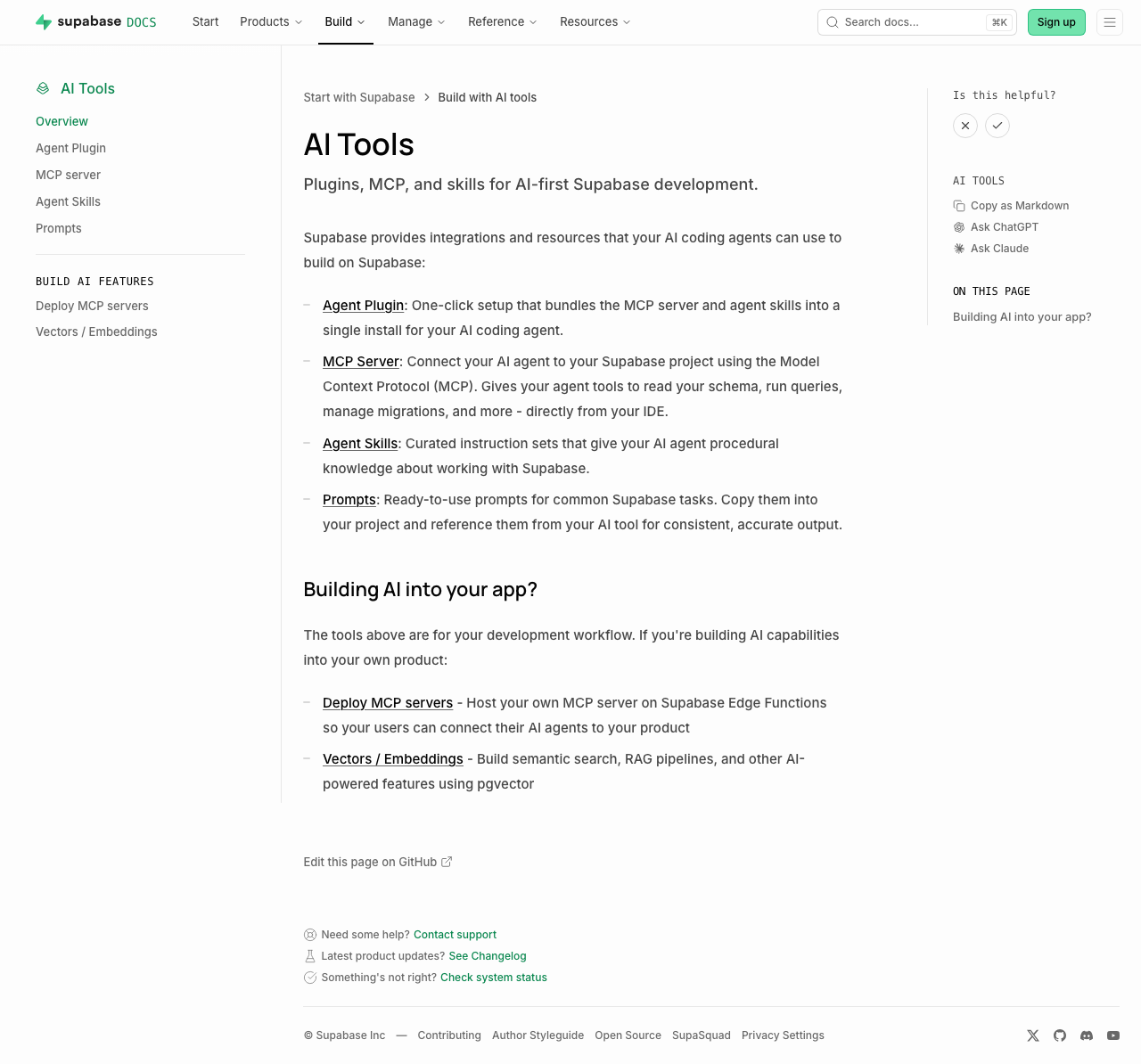 | 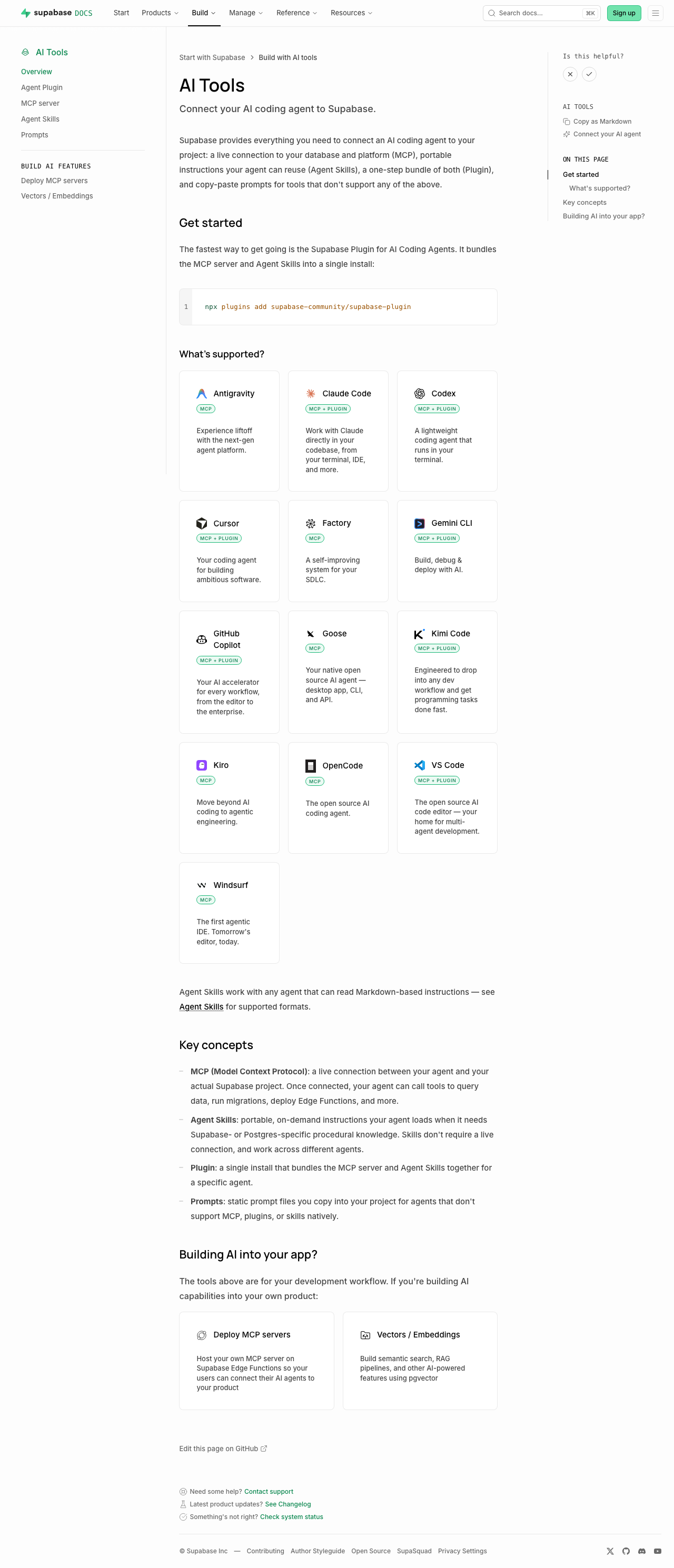 | Sub-pages each just add a one-line "Quick start" callout under the intro (no other layout change): [plugins](https://supabase.com/docs/guides/ai-tools/plugins) ([preview](https://docs-git-nikrichers-docs-1201-make-guidesai-too-7c7493-supabase.vercel.app/docs/guides/ai-tools/plugins)) · [mcp](https://supabase.com/docs/guides/ai-tools/mcp) ([preview](https://docs-git-nikrichers-docs-1201-make-guidesai-too-7c7493-supabase.vercel.app/docs/guides/ai-tools/mcp)) · [ai-skills](https://supabase.com/docs/guides/ai-tools/ai-skills) ([preview](https://docs-git-nikrichers-docs-1201-make-guidesai-too-7c7493-supabase.vercel.app/docs/guides/ai-tools/ai-skills)). ### Test plan - [x] `/guides/ai-tools` renders callout → card grid → concepts → Building AI into your app, in order - [x] Card grid: one card per agent (no duplicate Copilot), Windsurf present, icons clean in both themes, taglines shown, badges below title - [x] Sidebar shows "Connect your AI agent"; self-hosting's "Official" badge unaffected - [x] `.md` route still serves clean markdown; no lingering `ask_ai_clicked`, ChatGPT/Claude icon, or `SupportedAgentsTable` references --------- Co-authored-by: Nik Richers <nik@validmind.ai> |

