mirror of
https://github.com/supabase/supabase.git
synced 2026-10-06 18:05:11 +03:00
chore/function-recent-errors
10
Commits
| Author | SHA1 | Message | Date | |
|---|---|---|---|---|
 Danny White Danny White
|
ec53175b8a |
refactor(ui): rename text-brand to text-primary (#50564)
## What kind of change does this PR introduce? Refactor. Follow-up to #49871. ## What is the current behavior? Branded (green) text still uses the `text-brand` classname while the colour comes from `--primary`. ## What is the new behavior? **Rename-only:** `text-brand` → `text-primary` across callsites and docs. Leftover `bg-brand` / `border-brand` alias to `brand-default`. No intentional colour changes in this PR. This better matches how we treat our green in other components and props, like `variant="primary"` for green buttons. ## To test On light mode: smoke-test that branded text still looks like #49871 (readable green, not the bright fill). - [Homepage](https://zone-www-dot-com-git-dnywh-depr-316-text-brand-de2380-supabase.vercel.app/): “Scale to millions” uses `text-primary` - [Docs homepage](https://docs-git-dnywh-depr-316-text-brand-to-primary-supabase.vercel.app/docs): branded links like “More on self-hosting” are still readable - [Typography docs](https://design-system-git-dnywh-depr-316-text-brand-to-primary-supabase.vercel.app/design-system/docs/typography): documents `text-primary` - [Colour usage](https://design-system-git-dnywh-depr-316-text-brand-to-primary-supabase.vercel.app/design-system/docs/color-usage): `text-primary` is visibly darker than `bg-brand-default` _on light mode_ - [Studio auth providers](https://studio-staging-git-dnywh-depr-316-text-brand-to-60fa6c-supabase.vercel.app/dashboard/project/_/auth/providers): enabled provider badge text readable; status dot stays bright green <!-- This is an auto-generated comment: release notes by coderabbit.ai --> ## Summary by CodeRabbit * **Style** * Updated branded text, link hover states, icons, badges, indicators, and highlighted content across the Design System, Docs, Studio, Learn, UI Library, and marketing experiences to use the primary theme color. * Updated syntax highlighting and table-of-contents styling for consistent primary-color presentation. * Refined brand color fallback behavior for bright fills and borders. * **Documentation** * Updated color-usage and typography guidance to recommend the primary text utility. <!-- end of auto-generated comment: release notes by coderabbit.ai --> |
||
|
Danny WhiteandJoshen Lim
|
a31ca2bad0 |
fix(ui): make brand text readable across themes (#49871)
## What kind of change does this PR introduce? Bug fix and design-system update. Resolves DEPR-316. Follow-up rename (`text-brand` → `text-primary`) is in a dedicated PR (https://github.com/supabase/supabase/pull/50564) stacked on this one. ## What is the current behavior? `text-brand` resolves to the canonical bright brand green in places that need readable text, which fails WCAG AA on light surfaces. A separate `text-brand-display` token adds another green for large type. ## What is the new behavior? - `text-brand` maps to accessible `--primary` (light mode darkened to meet ~4.5:1 AA) - `--hue` / `--primary-hue` aligned to 157.5 - `text-brand-display` removed; former display callsites use `text-brand` - Bright fills/borders stay on `brand-default` - Design-system colour and typography docs updated | Before | After | | --- | --- | | <img width="514" height="112" alt="CleanShot 2026-09-02 at 11 13 09@2x" src="https://github.com/user-attachments/assets/4e0138a9-a32d-4e4c-a426-90736706e1e7" /> | <img width="512" height="138" alt="CleanShot 2026-09-21 at 11 42 05@2x" src="https://github.com/user-attachments/assets/164cc5b1-a0c5-4e93-95f1-80016641a114" /> | | <img width="864" height="266" alt="CleanShot 2026-09-02 at 11 13 53@2x" src="https://github.com/user-attachments/assets/3c1ca53f-bf9e-431e-bc15-816b4a275b8e" /> | <img width="882" height="248" alt="CleanShot 2026-09-21 at 11 41 37@2x" src="https://github.com/user-attachments/assets/24828e7b-ed6b-44cb-b9dc-becc3398bdfc" /> | | <img width="782" height="692" alt="CleanShot 2026-09-02 at 11 16 30@2x" src="https://github.com/user-attachments/assets/fc871977-77bc-47fb-9e0e-9284e0ecd5cc" /> | <img width="730" height="690" alt="CleanShot 2026-09-21 at 11 42 52@2x" src="https://github.com/user-attachments/assets/bf479515-d5f9-471e-b82d-f097c0f4b56c" /> | | <img width="480" height="306" alt="CleanShot 2026-09-02 at 11 18 53@2x" src="https://github.com/user-attachments/assets/03f341f4-f02e-44f8-a2b2-8c31670d0427" /> | <img width="470" height="300" alt="CleanShot 2026-09-21 at 11 43 19@2x" src="https://github.com/user-attachments/assets/9df18217-d5e6-48b8-ba0b-579d2664b94b" /> | | <img width="960" height="300" alt="CleanShot 2026-09-02 at 11 32 04@2x" src="https://github.com/user-attachments/assets/6b1d9373-7a71-4247-81ff-26441604b09d" /> | <img width="980" height="306" alt="CleanShot 2026-09-21 at 11 44 13@2x" src="https://github.com/user-attachments/assets/41ad4784-02ec-4b29-b860-32af9fa79aa8" /> | | <img width="924" height="214" alt="CleanShot 2026-09-02 at 11 34 44@2x" src="https://github.com/user-attachments/assets/1de661fe-c7b6-499b-a94f-e4737436ec79" /> | <img width="752" height="162" alt="CleanShot 2026-09-21 at 11 44 56@2x" src="https://github.com/user-attachments/assets/1811890f-0660-4445-84e9-447720954fa1" /> | ## To test Test each callsite **in light mode** (dark mode is largely unchanged). ### WWW - [Homepage](https://zone-www-dot-com-git-dnywh-depr-316-brand-text-tokens-supabase.vercel.app/): “Scale to millions” uses readable brand text (display token is gone) - [Careers](https://zone-www-dot-com-git-dnywh-depr-316-brand-text-tokens-supabase.vercel.app/careers): small “Careers” eyebrow readable; green dividers stay bright `brand-default` - [Contact](https://zone-www-dot-com-git-dnywh-depr-316-brand-text-tokens-supabase.vercel.app/contact-us): email / policy links use readable brand text - [Regions](https://zone-www-dot-com-git-dnywh-depr-316-brand-text-tokens-supabase.vercel.app/regions): “Ask about early access to BYOC” readable ### Docs - [Docs homepage](https://docs-git-dnywh-depr-316-brand-text-tokens-supabase.vercel.app/docs): “DOCS” wordmark and resource links readable - [Database overview](https://docs-git-dnywh-depr-316-brand-text-tokens-supabase.vercel.app/docs/guides/database/overview): nav / footer brand links readable - [JavaScript reference](https://docs-git-dnywh-depr-316-brand-text-tokens-supabase.vercel.app/docs/reference/javascript/introduction): active sidebar treatment readable ### Design system - [Typography](https://design-system-git-dnywh-depr-316-brand-text-tokens-supabase.vercel.app/docs/typography): documents `text-brand` only (no display) - [Colour usage](https://design-system-git-dnywh-depr-316-brand-text-tokens-supabase.vercel.app/docs/color-usage): `text-brand` vs `bg-brand-default` - [Design-system homepage](https://design-system-git-dnywh-depr-316-brand-text-tokens-supabase.vercel.app/): brand text examples across themes ### Studio - [Auth providers](https://studio-staging-git-dnywh-depr-316-brand-text-tokens-supabase.vercel.app/dashboard/project/_/auth/providers): enabled provider badge text readable; status dot stays bright - [Database policies](https://studio-staging-git-dnywh-depr-316-brand-text-tokens-supabase.vercel.app/dashboard/project/_/database/policies?new=true): template hover text more legible - [Database connections](https://studio-staging-git-dnywh-depr-316-brand-text-tokens-supabase.vercel.app/dashboard/project/_/observability/connections): “Live” status readable; animated dot stays bright green --------- Co-authored-by: Joshen Lim <joshenlimek@gmail.com> |
||
|
Pedro Rodrigues
|
16046a0139 |
docs: add omp (oh-my-pi) to supported clients in MCP and plugin guides (#50045)
## What this does

Adds **omp** (oh-my-pi) across the Supabase AI-tools docs.

- **Plugin docs** (`AgentPluginsPanel`) — omp client + Anthropic
marketplace install: `omp plugin marketplace add
anthropics/claude-plugins-official`, then `omp plugin install
supabase@claude-plugins-official`.
- **MCP docs** (`McpUrlBuilder`) — omp under "AI Agent CLI":
`.omp/mcp.json` / `~/.omp/agent/mcp.json` (JSON), `/mcp add` guided
setup, project vs user scope.
- **"Pick your agent" grid** — add the omp logo and tagline ("A coding
agent with the IDE wired in.").

No CLI command mapping entry — omp has no `omp mcp …` subcommand, so the
page documents file-based setup (`/mcp add` wizard or direct JSON edit).
Matches other file-configured clients like kiro.

## Testing

Verified against omp 18.1.11: written `.omp/mcp.json` parsed by runtime,
`/mcp list` shows server connected; `omp plugin marketplace add/install
supabase@claude-plugins-official` works; `omp plugin list` confirms
installed.

## Preview

### Agent Plugin page

<img width="1128" height="706" alt="image"
src="https://github.com/user-attachments/assets/1f06895b-2d45-4b64-b9ab-c1670201c370"
/>


### MCP page

<img width="1128" height="706" alt="image"
src="https://github.com/user-attachments/assets/30a9a823-0e78-4c3b-aeeb-3a6a7aa40ed6"
/>


### AI Tools main page

<img width="1128" height="706" alt="image"
src="https://github.com/user-attachments/assets/064a3234-9f4d-4f0a-9598-fbb2a465266f"
/>


Closes AI-1184

<!-- This is an auto-generated comment: release notes by coderabbit.ai
-->

## Summary by CodeRabbit

- **New Features**
- Added OMP as a supported AI coding agent across documentation and
integrations.
- Added OMP installation guidance, including marketplace setup, scope
options, session reloads, and authentication.
  - Added support for configuring the Supabase MCP server through OMP.
- Added OMP branding, icon, tagline, repository, and documentation
links.

<!-- end of auto-generated comment: release notes by coderabbit.ai -->
|
||
|
Pedro RodriguesandClaude Opus 4.8
|
d3146a1755 |
docs: add Grok plugin and MCP install instructions (#49212)
## What this does Adds **Grok** (Grok Build) across the Supabase AI-tools docs, and fixes two logo gaps. - **Plugin docs** (`AgentPluginsPanel`) — Grok client + `grok plugin install …` / in-session `/plugins` steps. - **MCP docs** (`McpUrlBuilder`) — Grok under "AI Agent CLI": `~/.grok/config.toml` (`[mcp_servers.supabase]`), `grok mcp add … --transport http`, OAuth steps. - **"Pick your agent" grid** — add the Grok logo, and fix **Warp**'s pre-existing missing logo (both were absent from the grid's `ICON_ASSETS` map). - **Fix**: the plugins-page Cursor entry was missing `hasDistinctDarkIcon`, so its dark-mode logo fell back to the light mark — aligned with the MCP list. - Adds Grok + Warp agent logos (light + dark). ## Testing Verified against grok `1.0.5`: `grok plugin install …` works; the generated `config.toml` and `grok mcp add` command are both parsed by `grok mcp list`. Pairs with supabase-community/supabase-plugin#45 (the `.grok-plugin` surface); merge after that lands. ## Preview [Agent Plugin page](https://docs-git-pedrorodrigues-ai-932-add-grok-agent-p-12402b-supabase.vercel.app/docs/guides/ai-tools/plugins#manual-installation) <img width="877" height="378" alt="image" src="https://github.com/user-attachments/assets/8fd9e112-5c11-412b-bd8c-611912043e6d" /> [MCP page](https://docs-git-pedrorodrigues-ai-932-add-grok-agent-p-12402b-supabase.vercel.app/docs/guides/ai-tools/mcp#remote-mcp-installation) <img width="877" height="513" alt="image" src="https://github.com/user-attachments/assets/459de070-5049-433a-929f-9902222e157d" /> [AI Tools main page](https://docs-git-pedrorodrigues-ai-932-add-grok-agent-p-12402b-supabase.vercel.app/docs/guides/ai-tools#pick-your-agent) <img width="877" height="642" alt="image" src="https://github.com/user-attachments/assets/e6ca40d2-e9c9-466c-a837-dbda4bdc09f7" /> Closes AI-932, AI-974 <!-- This is an auto-generated comment: release notes by coderabbit.ai --> ## Summary by CodeRabbit ## New Features - Added Grok as a supported AI tool and MCP client. - Added Grok installation instructions, CLI setup, authentication, and connection verification guidance. - Added Grok icons for light and dark themes. - Added support for custom documentation link text in plugin panels. - Added Warp to the available icon assets. <!-- end of auto-generated comment: release notes by coderabbit.ai --> --------- Co-authored-by: Claude Opus 4.8 (1M context) <noreply@anthropic.com> |
||
|
Nik RichersandNik Richers
|
e0ecaadc21 |
docs: make AI tools section agent-first (#48167)
## I have read the [CONTRIBUTING.md](https://github.com/supabase/supabase/blob/master/CONTRIBUTING.md) file. YES ## What kind of change does this PR introduce? This PR reworks the `/guides/ai-tools` docs section to be agent-first. The overview now leads with the fastest path to a working setup (the plugin install command), a "What's supported?" card grid showing which coding agents and IDEs work via Plugin and/or MCP (with each product's own tagline, not a generated sentence), and a concepts glossary — instead of a plain four-item list. The sidebar "AI Tools" widget, shown on every guides page, now links to this hub ("Connect your AI agent") instead of opening a ChatGPT/Claude chat frontend. Closes DOCS-1201. ## What is the current behavior? - The `/guides/ai-tools` overview is a plain four-item bullet list with no getting-started path, compatibility info, or concepts explanation. - The sidebar "AI Tools" widget offers "Copy as Markdown", "Ask ChatGPT", and "Ask Claude" — the latter two send you to a chat frontend instead of agent setup. ## What is the new behavior? - `ai-tools.mdx`: intro → plugin install callout → "What's supported?" card grid (`<ContentListings id="ai-tools-supported-agents" />`, icon + tagline + Plugin/MCP badge per agent) → "Key concepts" glossary → "Building AI into your app?" (also converted to `ContentListings`). - New `data/content-listings/ai-tools.data.ts` builds the card grid from the existing `PLUGIN_CLIENTS`/`MCP_CLIENT_DATA` client lists (no new hand-maintained data) — fixing two latent bugs found along the way: GitHub Copilot was keyed differently between the two sources (would have produced duplicate cards), and Windsurf has no upstream docs URL (would have been silently dropped). - New opt-in `badgePosition` field on `ContentListingItem` so the badge renders under the title for the agent grid, without changing the one other existing badge usage (self-hosting's "Official" tag, still inline). - `plugins.mdx`/`mcp.mdx`/`ai-skills.mdx` each get a one-line "Quick start" lead-in so they stand alone via the `.md` content-negotiation route. - `GuidesSidebar.tsx` + `telemetry-constants.ts`: Added "Connect your AI agent" → `/guides/ai-tools`, and the `ask_ai_clicked` event with `agent_setup_clicked`. - Accessibility fix (from review): the "Not supported" indicator now exposes an `sr-only` label instead of being fully `aria-hidden`. ## Additional context - Worktree: `~/GitHub/supabase/supabase-worktrees/nikrichers/docs-1201-make-guidesai-tools-agent-first-and-replace-chat-frontend` - **Open question — Windsurf card**: `windsurf.com` now redirects to a Devin Desktop page (Cognition acquired Windsurf in 2025), but Supabase's own `MCP_CLIENT_DATA` still targets Windsurf's distinct config path (`~/.codeium/windsurf/mcp_config.json`), so the card is still labeled "Windsurf" with its pre-acquisition tagline ("The first agentic IDE. Tomorrow's editor, today."). Needs a follow-up decision on whether to relabel/merge/drop this card once Devin Desktop's MCP support (if any) is confirmed. - Follow-up (not in this PR): deeper IA rework of the ai-tools section belongs to the broader agent-first audit; `content/guides/resources/glossary.mdx` has no MCP/Agent Skills/Plugin/Prompts entries yet — this PR's "Key concepts" is currently the only definition of these terms site-wide. - Verification: | Check | Result | | --- | --- | | Lint (`lint:mdx`, `eslint`), `typecheck`, `test:local lib/content-listings.test.ts` | Pass — 13/13 tests, 0 errors | | `build:guides-markdown` | Pass — card grid flattens cleanly to markdown | | Playwright: broken icon requests, light + dark theme, PR preview | Pass — 0 in either theme | | `/guides/self-hosting` "Official" badge (existing `ContentListings` usage) | Pass — unaffected by the new `badgePosition` opt-in | ### Before & After #### [`/guides/ai-tools`](https://supabase.com/docs/guides/ai-tools) Also shows the sidebar change (right rail): "Ask ChatGPT" / "Ask Claude" → "Connect your AI agent". | [Before](https://supabase.com/docs/guides/ai-tools) | [After](https://docs-git-nikrichers-docs-1201-make-guidesai-too-7c7493-supabase.vercel.app/docs/guides/ai-tools) | | --- | --- | | 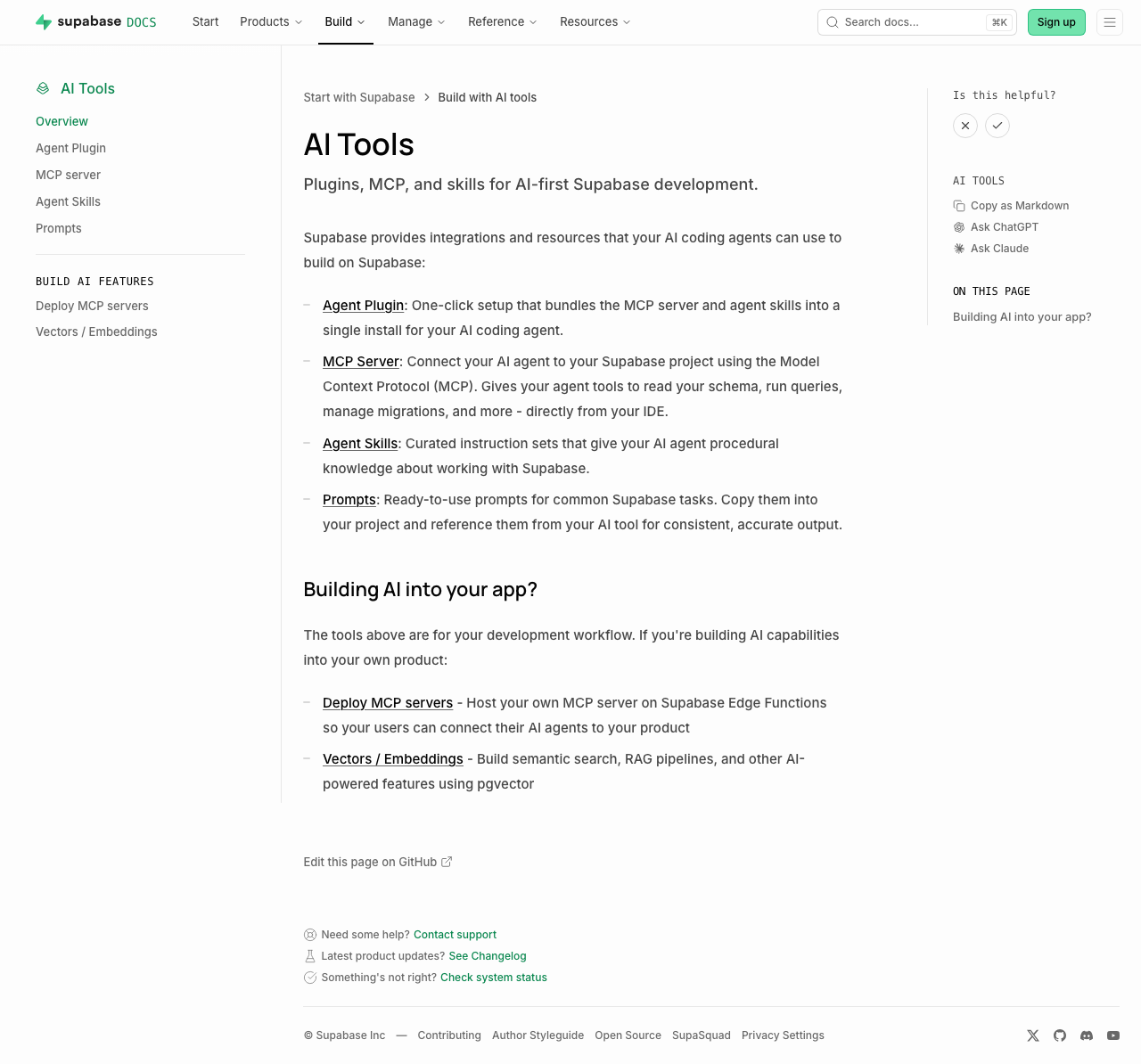 | 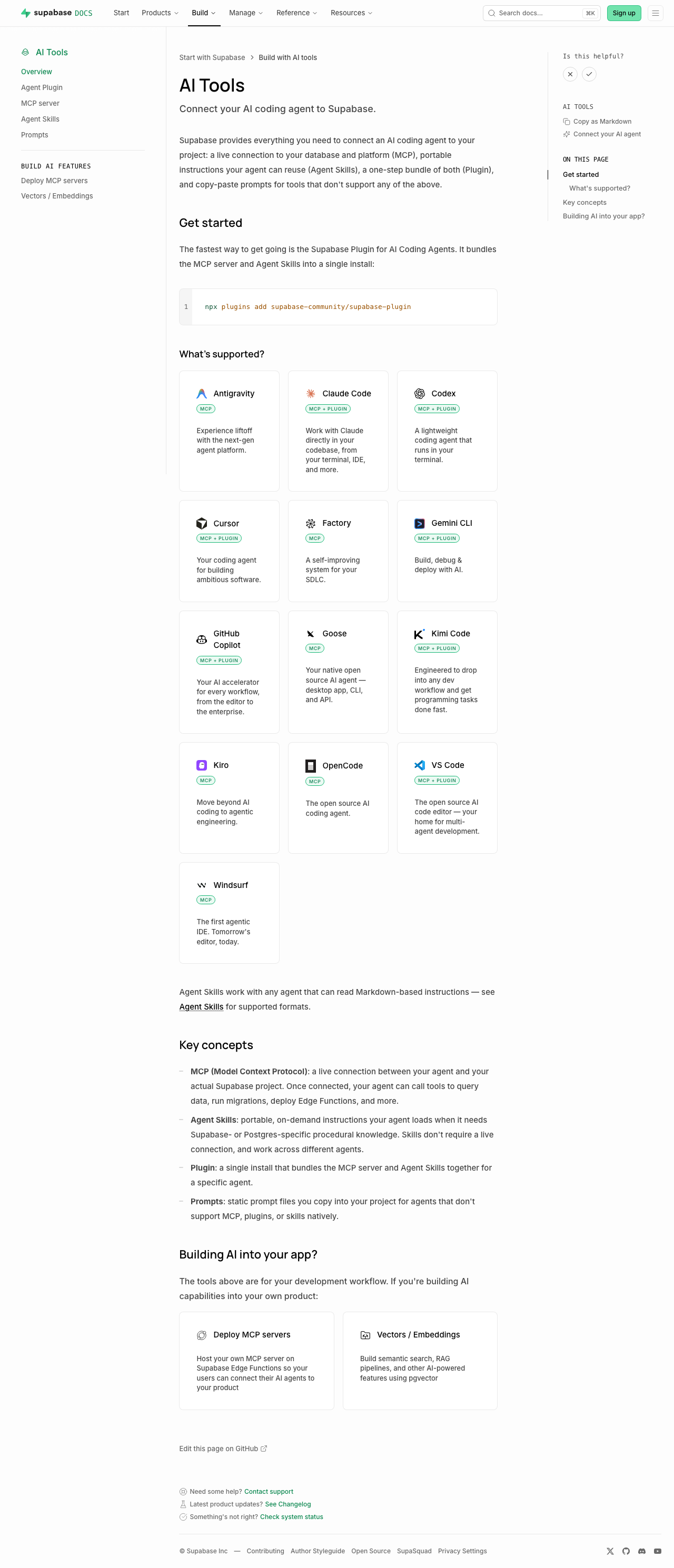 | Sub-pages each just add a one-line "Quick start" callout under the intro (no other layout change): [plugins](https://supabase.com/docs/guides/ai-tools/plugins) ([preview](https://docs-git-nikrichers-docs-1201-make-guidesai-too-7c7493-supabase.vercel.app/docs/guides/ai-tools/plugins)) · [mcp](https://supabase.com/docs/guides/ai-tools/mcp) ([preview](https://docs-git-nikrichers-docs-1201-make-guidesai-too-7c7493-supabase.vercel.app/docs/guides/ai-tools/mcp)) · [ai-skills](https://supabase.com/docs/guides/ai-tools/ai-skills) ([preview](https://docs-git-nikrichers-docs-1201-make-guidesai-too-7c7493-supabase.vercel.app/docs/guides/ai-tools/ai-skills)). ### Test plan - [x] `/guides/ai-tools` renders callout → card grid → concepts → Building AI into your app, in order - [x] Card grid: one card per agent (no duplicate Copilot), Windsurf present, icons clean in both themes, taglines shown, badges below title - [x] Sidebar shows "Connect your AI agent"; self-hosting's "Official" badge unaffected - [x] `.md` route still serves clean markdown; no lingering `ask_ai_clicked`, ChatGPT/Claude icon, or `SupportedAgentsTable` references --------- Co-authored-by: Nik Richers <nik@validmind.ai> |
||
|
Pedro Rodrigues
|
ceb4110568 |
docs: add VS Code to the AI coding agent plugin install picker (#48108)
Adds VS Code to the AI coding agent plugins docs, as VS Code now [supports plugins](https://code.visualstudio.com/docs/agent-customization/agent-plugins) <img width="763" height="396" alt="image" src="https://github.com/user-attachments/assets/7520a83c-5652-44b4-9136-013f3da5f45b" /> ### Steps to reproduce it 1. Navigate to https://docs-git-add-vs-code-plugins-support-to-docs-supabase.vercel.app/docs/guides/ai-tools/plugins#manual-install 2. Select "VS Code" in the `Client` dropdown <!-- This is an auto-generated comment: release notes by coderabbit.ai --> ## Summary by CodeRabbit * **New Features** * Added Visual Studio Code to the supported plugin integrations. * Added VS Code installation guidance, including the plugin repository and manifest specification links. <!-- end of auto-generated comment: release notes by coderabbit.ai --> |
||
|
Pedro RodriguesandClaude Opus 4.8
|
45ba40eff9 |
docs: add Kimi Code to MCP and AI coding agent plugin setup (#48099)
Adds Kimi Code to the MCP server setup and AI coding agent plugins docs: ### MCP Server config <img width="755" height="703" alt="image" src="https://github.com/user-attachments/assets/b350aca0-ff0d-442b-b6f3-b3b4355d8fcd" /> ### AI coding agent plugins <img width="753" height="475" alt="image" src="https://github.com/user-attachments/assets/100d5893-4627-4f48-9ab6-16e0c6457467" /> Closes AI-933 <!-- This is an auto-generated comment: release notes by coderabbit.ai --> ## Summary by CodeRabbit * **New Features** * Added **Kimi Code** as a selectable plugin client in the plugins panel. * Added **Kimi-specific installation/setup instructions**, including guidance on placing `mcp.json`, confirming the trust prompt, and using `/plugins` plus `/mcp` and `/mcp-config`. * Extended the **MCP URL builder** to generate Kimi Code HTTP-based server configuration. * Included **Kimi** in the **IDE** client group with a dedicated **Kimi icon** for UI display. <!-- end of auto-generated comment: release notes by coderabbit.ai --> --------- Co-authored-by: Claude Opus 4.8 (1M context) <noreply@anthropic.com> |
||
|
Pedro RodriguesandClaude Sonnet 4.6
|
bf26acaa32 |
fix(docs): update Gemini CLI extension repo URL (#46736)
## Summary Update Gemini CLI Extension repo URL from https://github.com/supabase-community/gemini-extension to https://github.com/supabase-community/supabase-plugin. Closes [AI-807](https://linear.app/supabase/issue/AI-807/update-gemini-cli-installation-command-with-the-new-github-repo-in-our) <!-- This is an auto-generated comment: release notes by coderabbit.ai --> ## Summary by CodeRabbit * **Documentation** * Updated Gemini CLI plugin configuration to reference the Supabase community plugin repository * Updated installation instructions and repository links to reflect the new plugin location <!-- end of auto-generated comment: release notes by coderabbit.ai --> Co-authored-by: Claude Sonnet 4.6 <noreply@anthropic.com> |
||
|
Pedro RodriguesandClaude Sonnet 4.6
|
bc8bde37b6 |
docs: add GitHub Copilot plugin install instructions (#46232)
## Summary - Adds GitHub Copilot as an option in the `AgentPluginsPanel` component - Shows install instructions via Github repo (`copilot plugin install supabase-community/supabase-plugin`) <img width="1919" height="926" alt="image" src="https://github.com/user-attachments/assets/0bbb758a-ba78-425b-8925-64d7c4d9cc39" /> ## Notes - Marketplace install omitted for now — we only show the direct GitHub repo install until we confirm the [official marketplace](https://github.com/github/copilot-plugins) listing name - [PR](https://github.com/github/copilot-plugins/pull/40) to add Supabase Copliot plugin to the official plugin marketplace Closes [AI-773](https://linear.app/supabase/issue/AI-773/add-github-copilot-plugin-install-instructions-to-docs) <!-- This is an auto-generated comment: release notes by coderabbit.ai --> ## Summary by CodeRabbit ## Release Notes * **New Features** * Added GitHub Copilot plugin support with installation instructions, allowing users to integrate the plugin into their workflow. <!-- review_stack_entry_start --> [](https://app.coderabbit.ai/change-stack/supabase/supabase/pull/46232?utm_source=github_walkthrough&utm_medium=github&utm_campaign=change_stack) <!-- review_stack_entry_end --> <!-- end of auto-generated comment: release notes by coderabbit.ai --> --------- Co-authored-by: Claude Sonnet 4.6 <noreply@anthropic.com> |
||
|
Pedro RodriguesandClaude Sonnet 4.6
|
9fc5258004 |
feat(docs): Supabase Agent Plugin page (#45523)
## Summary - Adds a new `/guides/getting-started/plugins` docs page with an `AgentPluginsPanel` component - Per-client install instructions for Claude Code, Codex, Cursor, and Gemini CLI - Adds the page to the navigation under AI Tools - Removes the Claude Code plugin subsection from the AI Skills page (now covered here) Closes [AI-690](https://linear.app/supabase/issue/AI-690/agent-plugins-documentation) <!-- This is an auto-generated comment: release notes by coderabbit.ai --> ## Summary by CodeRabbit * **New Features** * Interactive plugin installation panel to choose from multiple AI coding agents with agent-specific setup instructions and quick links for help/feedback. * **Documentation** * New "Supabase Agent Plugin" guide describing features, included components, and one‑click installation UI. * Navigation updated to include the Supabase Agent Plugin guide under Getting Started → AI Tools. * AI skills guide streamlined by removing a specific plugin install snippet and clarifying agent compatibility. <!-- end of auto-generated comment: release notes by coderabbit.ai --> --------- Co-authored-by: Claude Sonnet 4.6 <noreply@anthropic.com> |


